Server Room Cabling NYC: The Complete Guide to Design, Standards and Installation
How to plan, build and maintain a clean, compliant and scalable server room in Manhattan and the surrounding boroughs.
QUICK ANSWER
Server room cabling in New York City is the organized system of fiber, copper, patch panels, cable trays and labels that connects network equipment inside a controlled IT space. A good design follows the TIA-942-B and BICSI 002 guidance, uses code-appropriate plenum or riser cable, keeps power and data separated, and is fully tested and documented.
If you run IT for a Manhattan office, a medical practice, a law firm or a growing company, server room cabling NYC projects come with challenges that most other cities never see: tight closets, shared risers, strict building rules, limited work hours and high real-estate costs. A poorly cabled room is more than an eyesore. It restricts airflow, hides faults and turns every move, add or change into a long outage.
This guide explains how structured cabling works inside a server room, which standards matter, how New York conditions change the plan, and how to hire the right installer. Whether you are building a new IT room or rescuing a tangled one, you will leave with a practical checklist.
Key Takeaways
- Design the room around zones: entrance room, main distribution area, horizontal distribution area and equipment area.
- Use fiber for backbone links and Cat6A for short copper runs, PoE devices and management ports.
- Match the cable jacket to the space: plenum-rated where air is recirculated, riser-rated for vertical shafts.
- Remove abandoned cable, label both ends of every run and keep as-built records.
- Confirm access, insurance and work-hour rules with building management before any crew arrives.
In this guide
- What server room cabling includes
- Standards that shape the design
- NYC codes, buildings and access rules
- Copper vs fiber for server rooms
- Pathways, racks and airflow
- Step-by-step planning process
- Labeling, testing and documentation
- Common mistakes to avoid
- How to choose a cabling contractor
- Frequently asked questions
What Does Server Room Cabling Include?
A server room is more than racks and switches. The cabling that links them is the part you cannot easily replace once the ceiling is closed and the room is live, which is why it deserves design attention first.
The core components
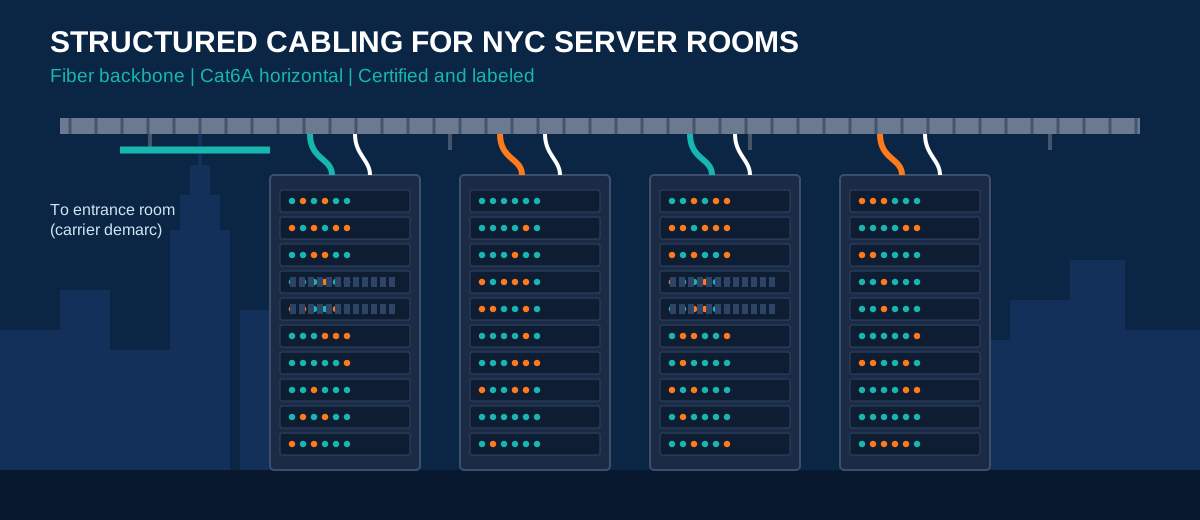
- Backbone cabling: high-capacity links, usually fiber, between the main equipment area and other distribution points or floors.
- Horizontal cabling: copper or fiber runs from patch panels to servers, access switches, wireless access points and devices.
- Patch panels and cross-connects: the termination points that let you change connections without touching permanent cable.
- Pathways: ladder rack, cable tray, conduit and vertical managers that carry and protect the cable.
- Labels, records and grounding: the details that make the room maintainable and safe.
Why structure matters
Structured cabling separates permanent infrastructure from patch cords. When a switch fails or a server moves, a technician changes a short patch cord instead of pulling a new run through the ceiling. That is how well-built rooms stay stable for ten years or more while the equipment inside them changes several times.
Standards That Shape a Server Room
You do not have to invent a layout. Industry bodies have already defined how server rooms and data centers should be organized, and most professional installers design to the same documents.
TIA-942-B: the telecommunications infrastructure standard
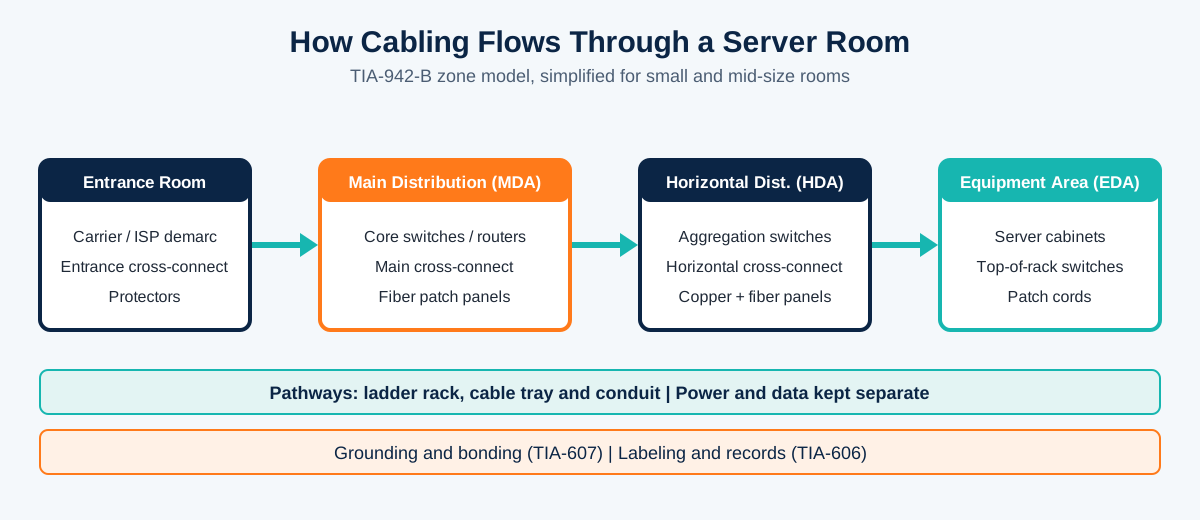
The Telecommunications Industry Association (TIA) publishes TIA-942, which covers data center spaces, pathways and cabling. According to Cabling Installation & Maintenance, a typical layout includes an entrance room, a main distribution area with the main cross-connect and several horizontal distribution areas. The standard also lays out common switch-to-server fabrics such as hierarchical star, leaf-spine and full mesh.
BICSI 002: best practices that go further
BICSI publishes ANSI/BICSI 002, a best-practice document that complements TIA-942 and in several areas recommends more than the minimum. Industry trainers often suggest designing with both documents together, using TIA for the baseline and BICSI for the details on architecture, power, cooling and security (see this fiber standards overview).
Supporting standards you will hear about
- TIA-568: performance and installation rules for commercial cabling.
- TIA-569: pathways and spaces.
- TIA-606: labeling and administration.
- TIA-607: bonding and grounding.
- Uptime Institute tiers: a separate reliability classification you can review at the Uptime Institute.
Server Room Cabling NYC: Codes, Buildings and Access Rules
Standards describe good engineering. New York adds the local layer: the building you are in, the code that applies to it and the rules management enforces. Treat the points below as a planning checklist, then confirm details with the NYC Department of Buildings, the FDNY and your landlord. We are describing general practice, not legal advice.
Plenum, riser and general-purpose cable
Cable jackets are rated for where they run. Plenum-rated cable uses low-smoke, flame-retardant materials and is intended for air-handling spaces, while riser-rated cable is built to resist flame spread through vertical shafts. Choosing the wrong rating can fail an inspection or a building review, so confirm the pathway before ordering cable. The National Electrical Code, published by NFPA, is the national baseline, and NYC applies its own electrical and fire requirements on top.
Abandoned cable must go
Under the current National Electrical Code, unused cable that is not tagged for future use is not allowed to stay in ceiling and floor plenum spaces. A renovation is the best time to strip out dead runs, which also frees tray space and removes a fire load.
Building rules are often stricter than permits
Even where a permit is not required for a low-voltage task, property managers commonly set their own requirements. Expect some or all of the following in Manhattan towers:
- Limited work hours and noise restrictions, often after business hours.
- Riser access with an escort, or a lockbox procedure for telecom rooms.
- Certificates of insurance and an approved-vendor process.
- Specific penetration and firestopping requirements.
Build these into your schedule early. Many NYC projects slip because access approvals arrive later than the cable does.
Keep fire alarm wiring separate
Fire alarm cabling is its own category in New York, with performance rules and approved products that differ from standard data cable. Do not mix it with data pathways, and let the licensed fire alarm contractor handle that scope.
Copper vs Fiber in the Server Room
Most rooms use both. The practical question is where each one belongs. Cat6A is a strong choice for short copper runs, access-layer connections and anything that needs Power over Ethernet. Fiber is the better answer for backbone links, higher speeds and dense racks, because it carries more bandwidth over longer distances and is much thinner.
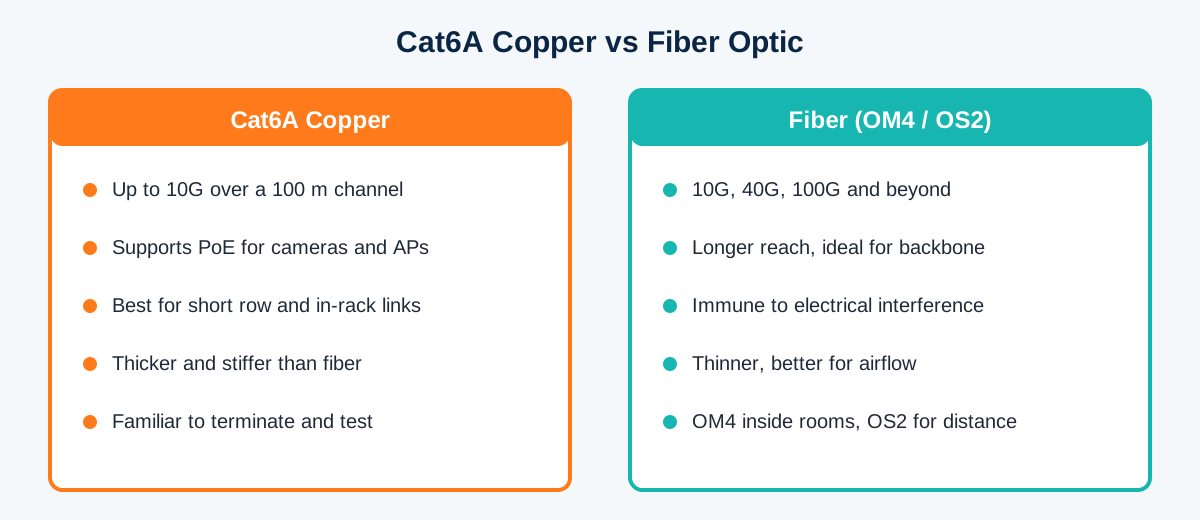
| Media | 10G reach (typical) | Power over Ethernet | Best use in a server room |
|---|---|---|---|
| Cat6A copper | Up to 100 m channel | Yes, up to 90 W (PoE++) | Short rack and row links, PoE devices, management ports |
| OM4 multimode fiber | About 400 m | No | Switch-to-switch links inside the room or building |
| OS2 single-mode fiber | Many kilometers with the right optics | No | Backbone between floors, buildings and carriers |
Mixing copper and fiber
Fiber and Cat6A can share a tray when they are bundled separately, kept clear of power cables and routed so that nothing is crushed or blocks airflow. Respect the minimum bend radius on both, and never overfill a tray. For more on the trade-offs, read this Cat6A vs fiber backbone comparison.
Pathways, Racks and Airflow
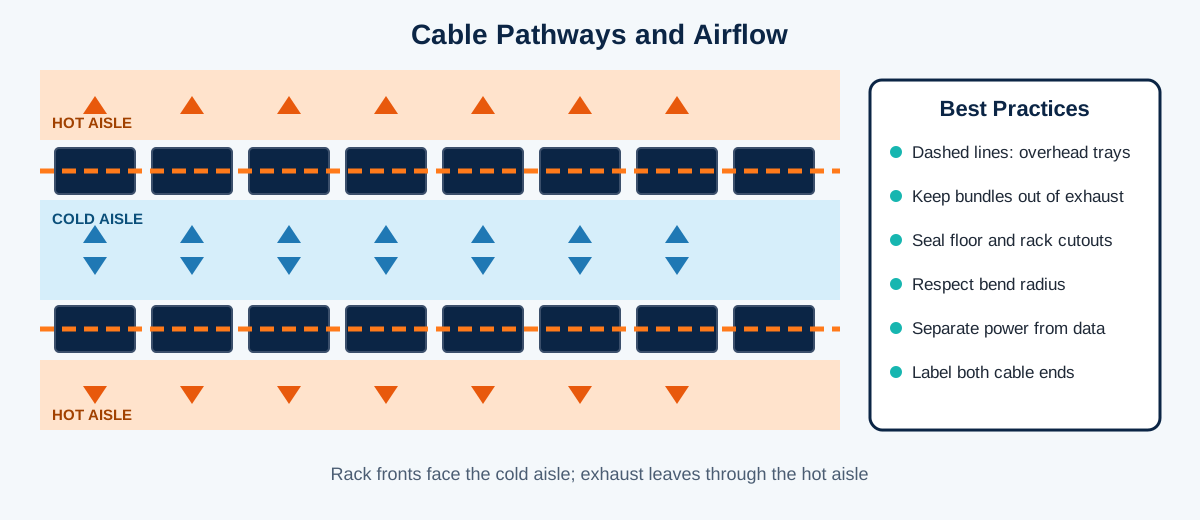
Good server room cabling NYC design treats cable as part of the cooling system. Heavy bundles that sit behind servers or across the cold aisle restrict airflow and force fans and air conditioners to work harder, which raises both heat and power cost.
Practical pathway rules
- Run overhead ladder rack above the racks for backbone and horizontal cable, keeping it out of the exhaust stream.
- Use vertical cable managers on each rack and short, color-coded patch cords.
- Seal floor and rack cutouts so cold air is not wasted.
- Keep data pathways physically separated from power to reduce interference and tidy the tray.
- Leave spare tray capacity, commonly about a quarter, for future growth.
Rack layout and growth
Place patch panels and switches so that cable lengths stay short and predictable. Zero-U vertical panels and thin patch cords free up space in small rooms. Plan the first row of racks with expansion in mind, because adding a second row later is far easier when tray and grounding are already sized for it.
Step-by-Step Planning Process
- Define requirements. List current and expected equipment, bandwidth, PoE devices, uptime goals and growth over five years. Decide early whether this is a small IT closet or a full computer room. NYC server room cabling plans that skip this step usually need rework.
- Survey the space. Measure ceiling height, check for risers, power, cooling and sprinkler heads, and photograph existing cable.
- Choose the topology. Map the entrance room, main distribution area and any horizontal distribution areas, using the TIA-942-B zone model as the template.
- Select media and components. Pick Cat6A and fiber types, connectors, patch panels and the correct jacket rating for each pathway.
- Get building approvals. Submit insurance, schedules and any drawings required by management, and confirm firestopping rules.
- Install and terminate. Pull cable with proper tension and bend radius, terminate neatly and dress it in the tray and managers.
- Test, label and hand over. Certify every run, label both ends and deliver as-built documents (covered next).
Labeling, Testing and Documentation
This is the stage that separates a professional install from a tidy-looking one. Without records, the room starts to decay the day the installers leave.
Test every link
Certify copper with a field tester against the Cat6A standard and test fiber for loss. Keep the reports, because they prove performance and support any manufacturer warranty.
Label consistently
Follow the TIA-606 approach: a unique identifier on both ends of each cable, on each patch panel port and on each rack. Add a simple spreadsheet or diagram so a new technician can trace a connection in minutes.
Hand over as-built drawings
Ask for rack elevations, tray layouts and a port map. Store a copy off-site so it survives a move or a failure.
Common Mistakes to Avoid
- Undersized pathways. Overfilled trays make future additions painful and block airflow.
- Wrong jacket rating. Using general-purpose cable where plenum or riser is required can fail review.
- Leaving dead cable. Abandoned runs add fire load and clutter, and can breach code.
- Mixing power and data. Parallel runs with power invite interference and make maintenance harder.
- Skipping labels and tests. You pay for it during the first outage.
- Ignoring building rules. Late access approvals, missing insurance or after-hours restrictions delay many New York jobs.
How to Choose a Cabling Contractor in New York
The installer you pick determines how the room performs for the next decade, so for any server room cabling NYC project, look for a team that designs and installs low-voltage systems, understands Manhattan buildings and offers ongoing support. Ask for references, sample test reports and proof of insurance, and make sure they will coordinate with building management.
New Tech Cabling is a low-voltage cabling company based in Midtown Manhattan, near 5th Avenue and 34th Street, serving offices and buildings across Manhattan, Brooklyn, Upper Manhattan, Jersey City, Hoboken and Union City. Its work covers structured cabling for voice, data and security networks, plus moves, adds and changes with IT partners. Relevant services for a server room project include:
- IT room build out
- Data center build out
- Low voltage cabling installation
- Low voltage cabling design build
- Relocations and project management
- Security systems cabling
You can also browse the full list of network installations and the company blog for more guides.
Frequently Asked Questions
What is server room cabling?
It is the structured system of fiber and copper cable, patch panels, trays and labels that connects network equipment inside a server room. It is designed so that connections can be changed with patch cords rather than by re-pulling permanent cable.
Which cable should I use for a server room, Cat6A or fiber?
Use both. Fiber suits backbone links and high-speed uplinks, while Cat6A suits short copper runs, PoE devices and management connections. Most well-designed rooms combine the two.
Do I need plenum-rated cable in New York City?
It depends on the pathway. Plenum rating applies to air-handling spaces, and riser rating applies to vertical shafts. Confirm the pathway and your building’s requirements before ordering cable.
How long does a server room cabling project take?
A small IT closet can take a few days of on-site work, while a larger room may take several weeks. Building access approvals and after-hours work windows are often the biggest schedule factors in New York.
Which standards apply to a server room?
TIA-942-B and ANSI/BICSI 002 are the main references for design, with TIA-568, 569, 606 and 607 covering cabling, pathways, labeling and grounding. Local electrical and fire codes also apply.
Should I remove old cable during an upgrade?
Yes. Unused cable that is not tagged for future use should not stay in plenum spaces under the National Electrical Code, and removing it frees tray space and improves airflow.
Plan Your Server Room Cabling With Local Experts
For reliable, standards-based server room cabling NYC businesses can depend on, talk to the New Tech Cabling team about your room, building and timeline.
Recent Comments