
Network Cabling for Financial Offices in Manhattan: What to Consider
Financial office network cabling NYC projects differ from ordinary office cabling in four ways. They need redundant paths so one failure does not stop the business, low-delay links for time-sensitive systems, physical and network security built into the cabling, and complete documentation that supports audits. Planning for these at the start costs far less than changing the wiring later.
Banks, asset managers, hedge funds, brokerages, insurers, wealth advisors and fintech firms all rely on their network in a way few other offices do. A short outage can interrupt trading, delay client work or raise questions from regulators. New Tech Cabling, based in Midtown Manhattan, designs and installs network cabling for New York businesses. This guide explains what to consider when planning financial office network cabling NYC firms can depend on, from resilient design to documentation, and which questions to ask before you hire anyone.
Key takeaways
- Design for failure: Plan two separate paths for the services that matter most, and test that the network switches over as intended.
- Treat delay as a requirement: Choose cable and layout for the systems that are sensitive to delay, such as trading platforms and market data, not just for average speed.
- Build security into the physical layer: Locked rooms, labeled cable, disabled unused ports and separate networks all start with how the cabling is installed.
- Document everything: Accurate port lists, drawings and test results make audits, changes and troubleshooting much faster.
- Plan around the building: Manhattan towers have access rules, riser limits and after-hours requirements that shape the schedule.
In this guide
- Why financial offices need different cabling
- Resilience and redundancy
- Cabling needs by area of the office
- Low delay, bandwidth and cable choice
- Security and compliance support
- Telecom rooms, power and cooling
- Voice, video and client meetings
- Working inside Manhattan towers
- How the project is planned
- Questions to ask a cabling contractor
- Where we work in Manhattan
- Frequently asked questions
Why Financial Offices Need Different Cabling
A standard office can live with an occasional slow connection. A financial firm often cannot. Market data arrives continuously, orders and transactions are time-sensitive, client records are confidential and many firms must show that their systems and records are controlled. The cabling sits underneath all of this, so weaknesses in it appear as weaknesses in everything above it. For firms planning financial office network cabling NYC buildings can support, these are the pressures that shape the design:
- Cost of downtime: When trading, payments or client service stop, the loss can be large and immediate. The cabling design should limit how much of the office a single failure can affect.
- Time-sensitive traffic: Market data, order entry and real-time risk systems are sensitive to delay and interruption. A clean, short, well-built path helps keep that traffic steady.
- Heavy desk setups: Traders and analysts often use many screens, several computers and specialty devices at one desk. This calls for more outlets per desk than a typical office plan provides.
- Confidential information: Client data, deal information and personal financial details must be protected from both outsiders and unauthorized insiders, which affects how networks are separated and how ports are controlled.
- Regulatory expectations: Firms in New York may be subject to rules on cybersecurity, business continuity and recordkeeping. Cabling does not make a firm compliant on its own, but it supports many of the controls that regulators and auditors ask about.
- Frequent change: Teams form, move and grow quickly, so the cabling needs spare capacity and a clear documentation system that keeps up with change.
- Client-facing expectations: Meeting rooms, video conferences and reception areas shape how clients see the firm, so connections there must be reliable and tidy.
Resilience and Redundancy: Planning for Failure
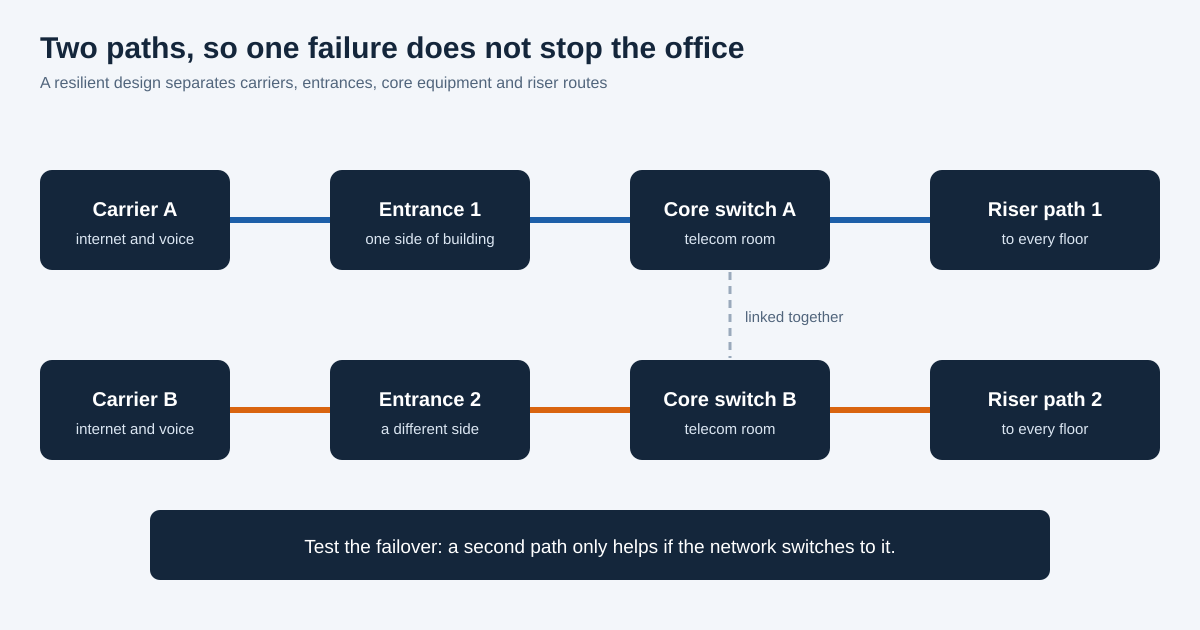
Redundant network cabling means having a second, separate path for critical services, so a cut cable, failed switch or building issue on one route does not take the whole firm offline. It costs more than a single path, so it is worth deciding early which services truly need it. Regulators such as FINRA expect member firms to plan for business continuity, and resilient cabling is a physical part of that plan.
- Two internet and voice carriers: Using two providers means an outage at one does not cut the firm off. Ask each carrier how its service reaches the building, because two carriers that share the same street connection can fail together.
- Separate building entrances: Where the building allows, bring the two services in through different entrance points. This protects against a single cut, flood or construction accident that damages one entrance.
- Diverse riser and horizontal routes: Use two separate vertical paths between floors and avoid running both through the same shaft or conduit. For critical users, consider two cables from different routes to the same desk or room.
- Redundant core switching: Two core switches, each connected to every closet, let the network keep running if one device fails. The switches should be linked and configured to take over automatically.
- Dual uplinks from every closet: Each floor closet should connect back to the core in more than one way, so a single damaged uplink does not isolate a whole floor.
- Power protection: Battery backup (UPS) units keep network equipment alive through short outages and give time for generators or clean shutdowns. Ask whether equipment can connect to building generator power, if available.
- Failover testing: A second path is only useful if it works when needed. Schedule tests that deliberately disconnect a path and confirm that traffic moves to the other, and repeat the tests after major changes.
- Spare equipment and cable: Keeping spare switches, transceivers and patch cords on site or on call shortens repair time when something does fail.
- Disaster recovery links: If the firm has a second office or a data center, plan how it connects to the main office, and how staff can work if the main office is unavailable.
Cabling Needs by Area of the Financial Office
Different parts of a financial office carry different risks and uses. Planning by area, instead of using one standard layout throughout, puts the budget where it matters most.
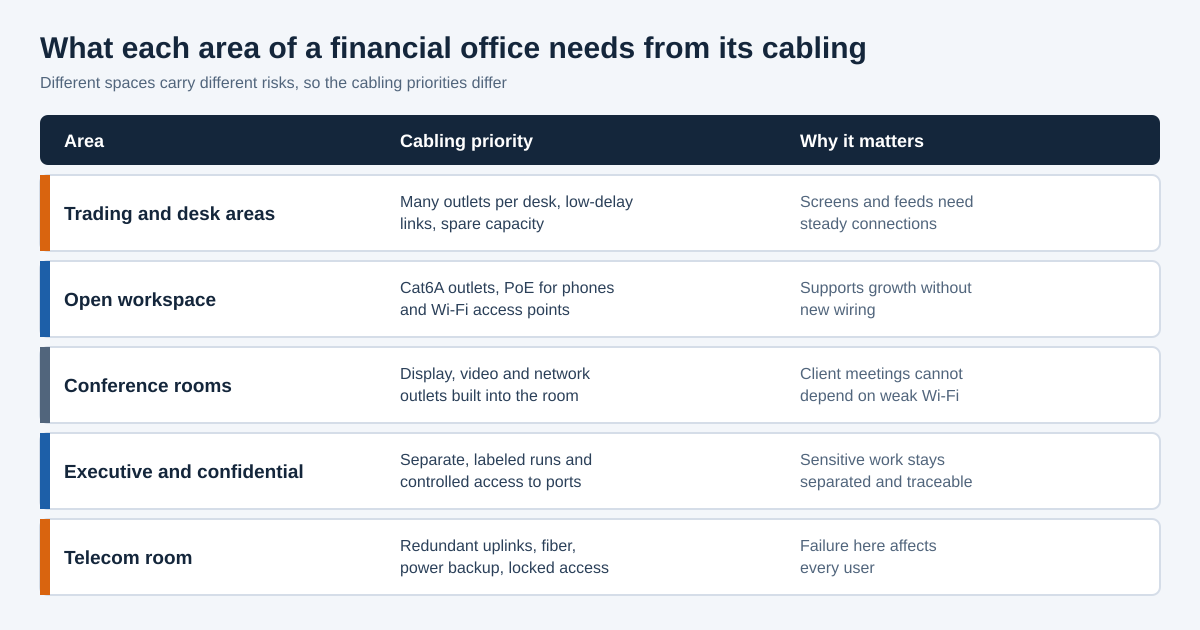
- Trading and desk areas: Plan several outlets per desk, with spare ports for extra screens, devices and future roles. Keep cable runs short and clean, and leave room in the pathways for more cable. Trading floor cabling should be tested carefully, because these users notice delays quickly.
- Open workspace: Use high-grade copper, such as Cat6A, for desks, and wire for Wi-Fi access points and Power over Ethernet phones. Place outlets in floor boxes or wall plates that suit flexible layouts and hot-desking.
- Conference and client meeting rooms: Include network outlets for the table, the display wall and the video system, as well as extra outlets for guests. Plan this with your audio/video team, and see our conference room design and build-out service.
- Executive and confidential areas: Consider separate, clearly labeled cable runs for offices handling sensitive work, such as deals, legal or compliance. Control who can use these ports, and keep their closets and panels apart where practical.
- Reception and shared spaces: Guest Wi-Fi, digital signage and visitor systems should be separate from the firm’s internal network. Plan their cabling to end on separate equipment or network groups.
- Security and building systems: Door access, cameras and visitor systems need reliable cabling too, and should be kept separate from the main data network. See our security systems cabling service.
- Telecom and server rooms: These need redundant uplinks, fiber connections, protected power, cooling and locked, logged access. More on this below.
Low Delay, Bandwidth and Cable Choice
Speed and delay are different things. Speed is how much data moves per second, while delay (latency) is how long a message takes to arrive. Many financial systems care more about delay and steadiness than about raw speed. Cabling cannot remove delay caused by software or carriers, but poor cabling can add to it, and good cabling avoids that.
- Fiber for backbones and critical links: Fiber carries high speeds over long distances, is not affected by electrical interference and is the usual choice between closets and to core equipment. For links that are time-sensitive, ask the design team about low latency fiber cabling and equipment that supports it.
- Cat6A for desks: Cat6A copper supports 10 Gigabit speeds over standard run lengths and leaves room for future equipment, which is useful for heavy desk setups and for Wi-Fi access points that need more bandwidth.
- Short, direct runs: Cable that follows a straight route with few connection points is more reliable than a long, patched-together path. Avoid unnecessary couplers, extension cords and daisy-chained switches.
- Quality components throughout: A cabling system is only as good as its weakest part. Use matched, certified cable, jacks, panels and patch cords, and avoid mixing grades.
- Interference control: Keep data cable away from power cable and heavy electrical equipment, and use shielded or fiber options where interference is a risk, such as near elevators and large motors.
- Capacity for growth: Market data volumes and application demands tend to rise. Spare fiber strands, spare conduit space and spare switch ports allow upgrades without rewiring.
- Verified performance: Test each cable against its standard and keep the results. For fiber, insist on loss testing, and use an OTDR for longer or more complex runs.
For the basics of fiber, see our guide to network installations, and the Telecommunications Industry Association (TIA) for the standards behind structured cabling.
Security and Compliance Support Built Into the Cabling
Network security is usually thought of as software, but it begins with physical access and a clean, known cabling layout. If anyone can plug into an empty wall jack or open an unlocked closet, the best firewall settings may not help. Good network cabling for financial offices supports security in four layers.
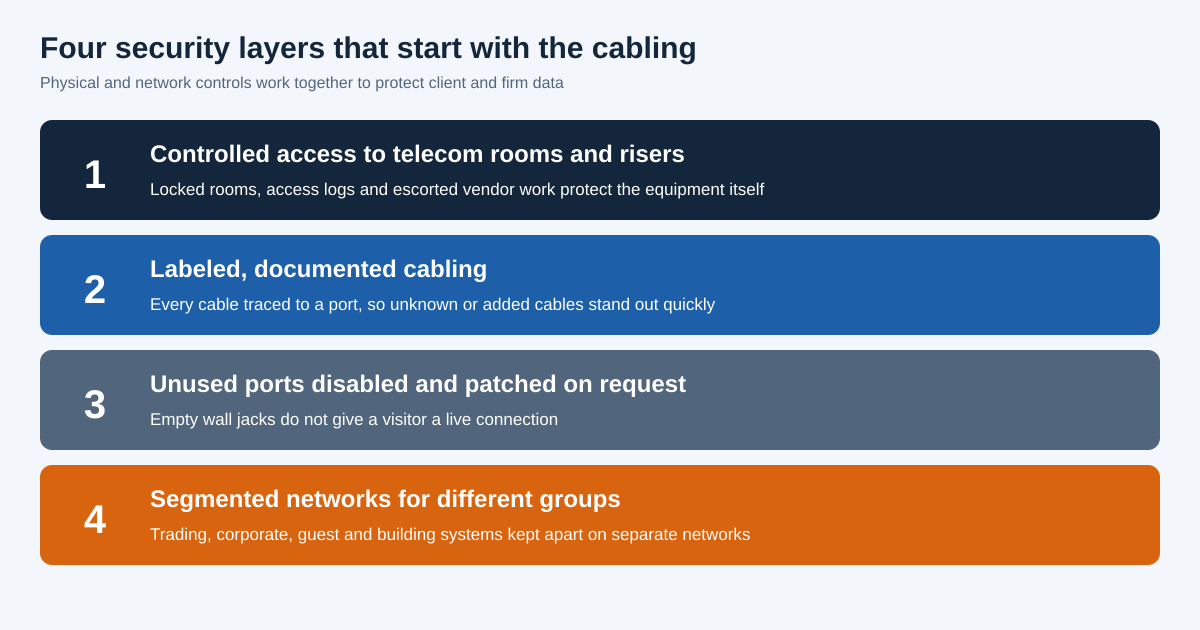
- Controlled access to telecom rooms and risers: Keep rooms locked, use badge or key logs and escort outside vendors. A secure telecom room protects the equipment, the patch panels and the records stored there.
- Labeled and documented cabling: When every cable is traced to a port, an unknown or added cable stands out quickly. This helps spot tampering and shortens investigations after an incident.
- Disabled unused ports: Wall jacks that are not in use should not be live. Ports can be left unpatched in the telecom room, or disabled on the switch, and turned on only on request.
- Segmented networks: Trading systems, corporate systems, guest Wi-Fi, building systems and cameras should sit on separate networks. Cabling that is planned and labeled by group makes this easier to build and to check.
- Color coding and tagging: Colored patch cords and tags for each network make mistakes less likely and let staff see at a glance what is connected where.
- Protected cable paths: Where cable passes through shared areas, use enclosed pathways or locked cabinets so it cannot be tapped or damaged easily.
- Change control: Record every move, add and change, with who requested it and when. A simple change log makes it easier to answer audit questions.
Many New York financial firms must also follow the New York State Department of Financial Services cybersecurity regulation (23 NYCRR Part 500), and some use the NIST Cybersecurity Framework to organize their controls. Cabling is only one part of meeting such requirements, so your compliance or security team should decide what applies to your firm, and your cabling contractor should work from those decisions.
Telecom Rooms, Power and Cooling for Financial Firms
- Dedicated, secured space: The telecom room should not double as a storage closet. It should have a lockable door, controlled access and enough space for equipment, cable management and technicians to work. For new or rebuilt rooms, see our IT room build-out service.
- Clean power and battery backup: Provide dedicated circuits, surge protection and a UPS sized for the equipment. Ask building management whether generator power can be extended to the room.
- Cooling and airflow: Network equipment produces heat, and small rooms warm up quickly. Check that cooling runs outside business hours and on weekends, and keep cable from blocking vents and airflow.
- Fire protection and monitoring: Confirm what fire suppression the room has, and consider environmental sensors for temperature, humidity and water that send alerts to your IT team.
- Second room or closet for large firms: Firms that occupy several floors may benefit from a second equipment room on a different part of the building, so one room does not become a single point of failure.
- Large server needs: If your firm hosts its own servers, see our data center build-out service. Many firms instead connect to outside data centers or cloud providers, which changes the fiber and bandwidth planning.
- Organized racks and cable: Tidy racks reduce mistakes during emergencies. Our cable management service covers labeling and organization.
Voice, Video and Client Meetings
- Voice over IP: Many firms use VoIP phones and some record calls for supervision or compliance. Call quality depends on stable cabling and a switch that supports Power over Ethernet. Ask your phone provider what it needs from the network.
- Video conferencing: Client calls and internal meetings depend on steady connections, so video rooms should be wired and not left to Wi-Fi.
- Turret and specialty devices: Trading desks sometimes use specialized voice or market devices with their own requirements. Share the vendor specifications with your cabling contractor before design starts.
- Wi-Fi as a supplement: Wireless is useful for laptops, tablets and phones, but fixed, important systems should stay on cable. Plan wired connections behind each access point.
- Guest access: Give visitors a separate guest network, with its own access points or network group, so clients can get online without touching the firm’s systems.
Working Inside Manhattan Towers
- Building rules and approvals: Most commercial towers require insurance certificates, work permits or tenant alteration approvals before cabling begins. Start this early, because approvals can set the start date.
- After-hours work: To avoid disrupting trading and client work, noisy or risky tasks are often scheduled evenings or weekends. Confirm the building’s allowed hours and any extra fees.
- Freight elevators and loading docks: Material and equipment usually move through a freight elevator with a booking system. Plan deliveries around these slots.
- Riser access and space: Shared riser space can be limited, and the landlord often controls it. Ask early how many cables can be added and who must approve.
- Carrier entrances: The building decides which carriers can enter and how. If you need diverse carrier paths, confirm which providers serve the building and how they enter.
- Fire and safety codes: Cable must have the right rating for each space, and openings through rated walls and floors must be firestopped. Check with building management and the New York City Department of Buildings, and see NFPA 70, the National Electrical Code.
- Moves and lease changes: Many firms change space as they grow. Plan for relocation early and see our relocation services if you are moving.
How a Financial Office Network Cabling Project Is Planned
A well-run project starts with your firm’s needs, not with a cable count. These six stages give the work a clear order and keep surprises low.
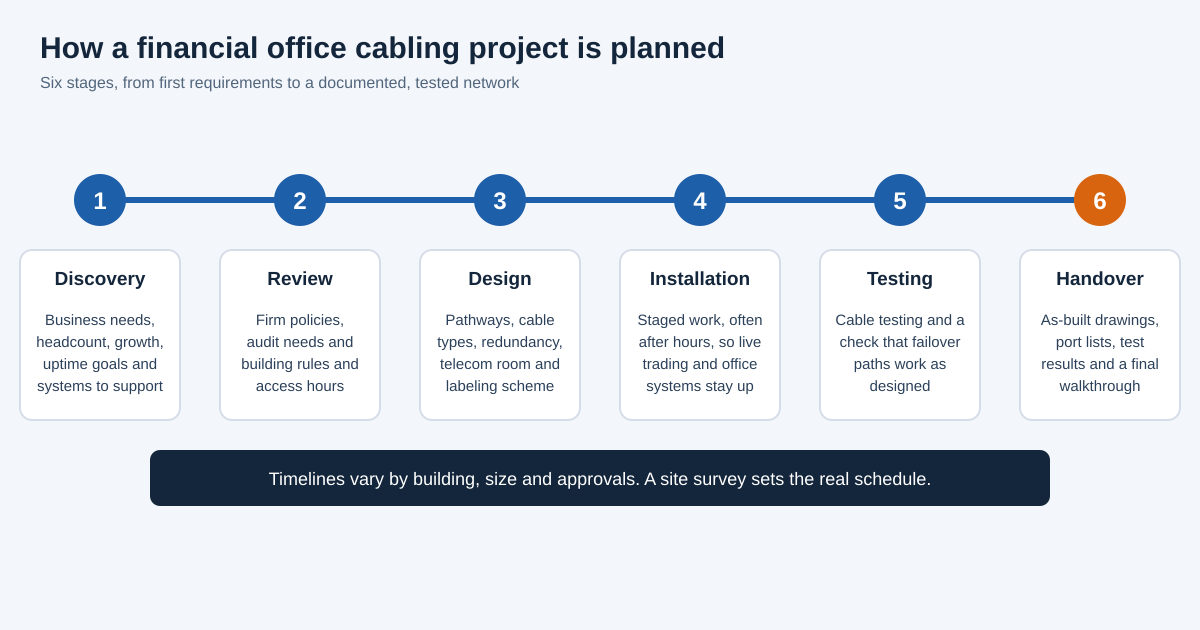
- Discovery: We learn about your firm, headcount, growth plans, critical systems and uptime goals, and which desks or teams are most sensitive to delay or interruption.
- Policy and building review: We review your security and continuity requirements as your compliance team describes them, along with the building’s rules, access hours and riser conditions.
- Design: We prepare the pathways, cable types, redundancy plan, telecom room layout and labeling scheme, and give you a written scope and quote before work begins.
- Installation: Work is staged, often after hours, so live systems stay up. Cable is routed, supported, terminated and labeled according to the plan.
- Testing and failover checks: Each cable is tested, and where redundancy is part of the design, the failover paths are checked together with your IT team or provider.
- Documentation and handover: You receive as-built drawings, port lists, test results and a walkthrough, so your team and any auditor can see exactly what is installed.
Questions to Ask a Financial Office Network Cabling Contractor
- Have you worked in occupied Manhattan commercial buildings? Experience with building rules, insurance and after-hours work prevents delays and keeps relationships with building management smooth.
- How will you keep live systems running during the work? The answer should describe staging, after-hours schedules and a plan for any short, planned interruption.
- How do you design and test redundant paths? Look for a clear explanation of diverse routes and a plan to test failover, not just a promise of two cables.
- What documentation will we receive? You should get drawings, port lists, labeling keys and test results in a form your IT or compliance team can use.
- How do you handle confidentiality? Contractors will work near sensitive areas. Ask about background checks, escorts, access logging and confidentiality terms.
- Can you work from our security and continuity requirements? A good contractor takes direction from your compliance and IT teams and does not guess at rules.
- What happens after handover? Ask how moves, adds, changes and repairs are handled and how quickly you can reach support.
- Can you provide references or reviews? Check our reviews on Yelp or ask for references from other New York offices.
Why Choose New Tech Cabling for Network Cabling for Financial Offices in Manhattan?
- Local knowledge of Manhattan buildings: We are based at 5th Avenue and 34th Street and understand the access, insurance and scheduling rules that commercial buildings set.
- Clean, labeled and documented work: Every cable is tested and labeled, and you receive records that help your team with audits, changes and troubleshooting.
- One team for data, voice, security and AV: We can plan the whole low voltage system together, which avoids overlapping pathways and keeps the design consistent.
- Careful work in live offices: We plan around your business hours, using staged and after-hours work where needed.
- Clear quotes and communication: You receive a written scope and price before work begins and stay informed on schedule and progress.
Where We Work in Manhattan
New Tech Cabling is located in Midtown Manhattan, at the corner of 5th Avenue and 34th Street. We serve financial and professional firms throughout Manhattan, including Midtown, the Financial District, Hudson Yards, Chelsea, the Flatiron District, SoHo and Tribeca, as well as Brooklyn, Upper Manhattan, Jersey City, Hoboken and Union City.
Frequently Asked Questions About Financial Office Network Cabling
What makes financial office cabling different from regular office cabling?
Financial offices need more redundancy, steadier low-delay links, stronger physical security and fuller documentation, because downtime, delay and data exposure carry higher cost and regulatory attention than in most other offices.
What does financial office network cabling NYC firms need to include?
At minimum: redundant paths for critical services, Cat6A at desks, fiber for backbones, a secured telecom room with backup power, labeled and documented cabling, separate networks for different groups, and tested failover.
Does cabling affect trading latency?
Yes, though only in part. Short, clean, well-terminated cable and fiber on critical links avoid adding delay, but total latency also depends on equipment, software and carriers.
Is Cat6A or fiber better for a financial office?
Both are used. Cat6A usually serves desks and access points, while fiber serves backbones, links between closets and critical or long connections. The right mix depends on the building and the systems you run.
Can cabling help with compliance?
It can support compliance by providing resilient paths, controlled access, labeled ports and records. It does not make a firm compliant by itself, so your compliance team should set the requirements.
Can the work be done without disrupting our business?
Usually, yes. Work can be staged and scheduled after hours, and any step that needs a short interruption can be planned with your team in advance.
How long does a financial office cabling project take?
It depends on the size of the space, the amount of redundancy and the building’s approval process. A site survey is needed to give an accurate schedule.
How do I get a quote?
Contact New Tech Cabling to schedule a site visit. We review your space and requirements and send a written scope and price before any work begins.
Request a Quote for Financial Office Network Cabling NYC
Planning a new office, an expansion or a network upgrade for your firm? Contact New Tech Cabling to discuss financial office network cabling NYC businesses can rely on. Our team will review your requirements, design a resilient and secure cabling plan and deliver clean, tested and documented work.
Call (212) 537-5965 | Schedule a consultation
Email: info@newtechcabling.com
Hours: Monday to Friday, 7:00 am to 6:00 pm
Location: 5th Avenue and 34th Street, Midtown Manhattan, New York
Learn more: All network services | Network installations | New Tech Cabling home
Recent Comments