
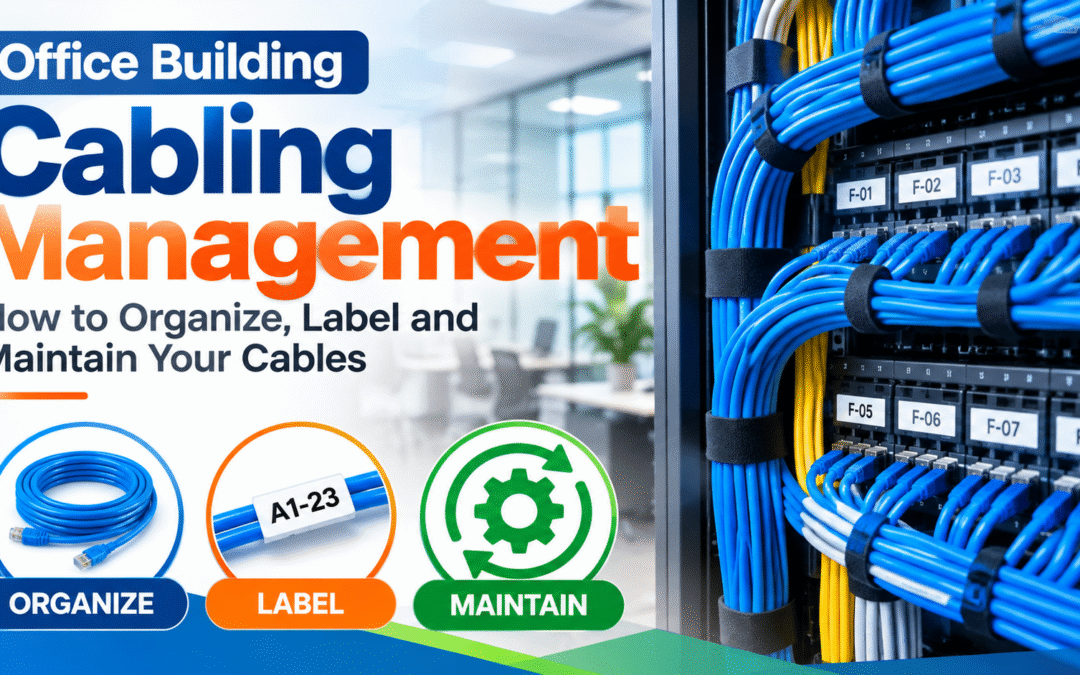
Office Building Cabling Management NYC: How to Organize, Label and Maintain Your Cables
In many offices the cabling starts out neat and slowly turns into a problem. A desk is moved, a new printer is added, a phone system is replaced, and each change leaves a few extra cables, a few unlabeled ends and a little more clutter in the ceiling and the network closet. After several years, nobody can say which cable goes where, a simple move takes a full day to trace, and an outage means guessing. Good office building cabling management prevents that. New Tech Cabling, based in Midtown Manhattan, helps New York businesses organize, label, document and maintain their cabling so the network stays reliable and easy to change.
This guide explains what cabling management covers, why it matters, which components and practices make up a well-managed system, how a cleanup project runs and how to keep things organized afterward. You can also see our cable management service or browse all of our network cabling services.
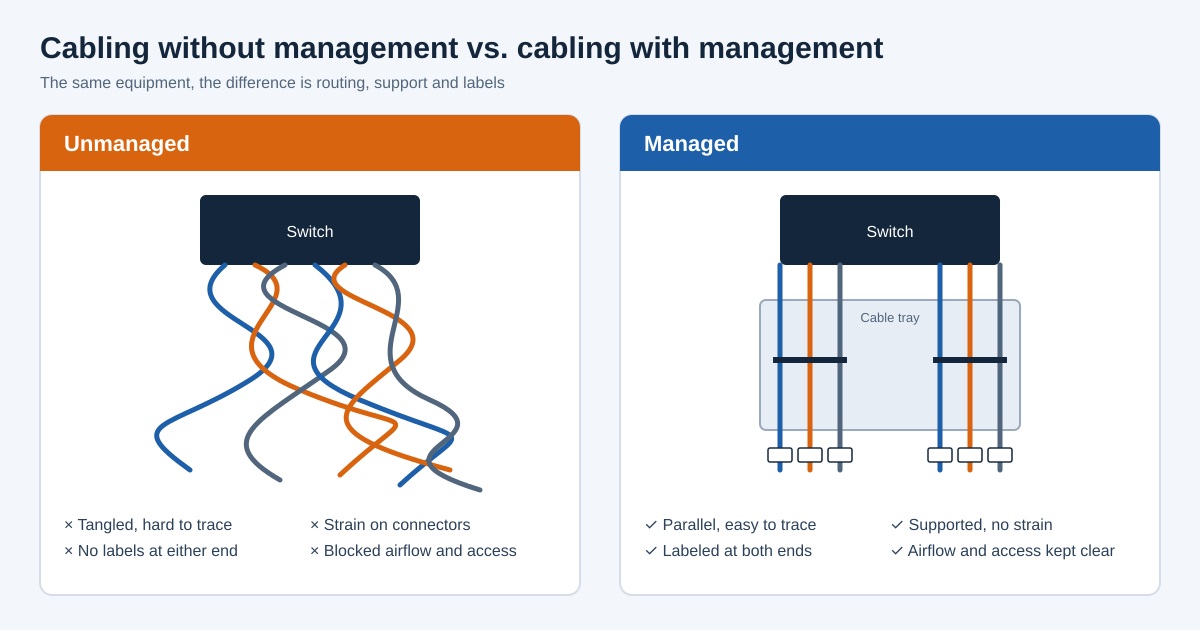
In this guide
- What office building cabling management is
- Why cabling management matters
- Problems caused by poor cable management
- Where cabling management applies in a building
- Components of a managed cabling system
- Telecom room and rack cable management
- Cable labeling and documentation
- Best practices for organized cabling
- Our cabling management process
- Cabling management challenges in NYC buildings
- Standards and codes
- What affects the cost
- Signs your office needs cabling management
- Keeping cables organized over time
- Common cable management mistakes
- How to choose a cabling management provider
- Frequently asked questions
What Is Office Building Cabling Management?
Office building cabling management is the practice of routing, supporting, separating, labeling and documenting every cable in a building so that the system stays safe, organized and easy to support. It applies to data cables, voice cables, fiber, security camera and access control cabling, audio/video cabling and power-adjacent low voltage runs, and it covers the whole path from the telecom room to each outlet, including the cable above the ceiling, in risers and in the equipment racks.
Cabling management is part design, part installation and part record keeping. A new installation can build in good management from the start, using trays, supports, labels and drawings. An older, grown-over system can be brought back under control through an audit, cleanup, relabeling and updated documentation. In both cases the goal is the same: anyone responsible for the network should be able to find, trace and change a cable quickly and without risk to the rest of the system.
Why Office Building Cabling Management Matters
- Faster troubleshooting: When every cable is labeled and documented, a technician can trace a problem in minutes instead of hours. That shortens outages, reduces support time and keeps employees working.
- Fewer network problems: Cable that is bent too tightly, pulled hard or crushed under other cable can lose performance or fail. Proper support and routing protect the cable and the connections at each end.
- Lower cost for moves, adds and changes: A documented system means staff moves, new desks and new equipment take less labor because no one has to hunt for the right cable or cut open a tangle to reach it.
- Better airflow and equipment life: Neat cable in racks and closets keeps vents clear and lets cool air reach the equipment, which helps switches and servers run at safe temperatures.
- Safer workspace: Cable routed in trays, supported in ceilings and kept out of walkways reduces trip hazards and the risk of cable being damaged or pulled loose.
- Code and building compliance: Correct cable ratings, firestopped openings and tidy pathways help meet building and fire-code requirements, which matters for inspections and building management approvals.
- Professional appearance: A clean telecom room and tidy visible cabling make a good impression on clients, auditors and IT staff, and reflect well on how the business is run.
- Room to grow: Clear records and spare capacity make it easy to add staff, equipment and floors without rebuilding what is already there.
Problems Caused by Poor Cable Management
- Unlabeled and mislabeled cables: Without reliable labels, even simple changes become guesswork. Staff may unplug the wrong cable, which can take down a department, a phone line or a security camera by mistake.
- Tangled patch cords in racks: A “spaghetti” rack hides ports, blocks access to equipment and makes every change risky, because moving one cord can disturb a dozen others.
- Abandoned cable: Old cables left behind after moves or upgrades fill pathways, add weight to ceiling supports and make it harder to add new cable. Dead cable can also create code concerns in some spaces.
- Damaged or strained cable: Cable draped over ceiling tiles, pinched by doors or pulled tight against sharp edges can degrade performance or fail intermittently, which is hard to diagnose.
- Blocked airflow and overheating: Heavy cable bundles in front of vents or inside racks restrict airflow, so equipment runs hotter and may fail sooner.
- Outdated or missing documentation: Drawings and port lists that no longer match reality are almost as unhelpful as having none. People trust them and then make mistakes.
- Mixed cable types and signals: Cable placed haphazardly beside power or other sources of interference can pick up noise, which affects data quality and can cause slowdowns that are hard to trace.
- Longer outages and higher support bills: All of the above add time to every fix. The cost of poor cable management usually shows up as repeated, avoidable service calls.
Where Cabling Management Applies in an Office Building
- Telecom rooms and IT closets: The most important area, where horizontal cables end at patch panels and connect to switches. This is where tidy routing and clear labels pay off every day. See our IT room build-out service for new or rebuilt rooms.
- Equipment racks and cabinets: Patch cords, power cords and fiber jumpers need horizontal and vertical managers, correct lengths and a consistent layout so each port can be reached and traced.
- Above-ceiling pathways: Cable above drop ceilings should be supported on trays or hangers, not laid on ceiling tiles or fixed to pipes and ductwork. Good routing keeps cable accessible and protected.
- Risers and vertical shafts: Backbone cables that connect floors need secure support, correct ratings and firestopping where they pass through floors and fire-rated walls.
- Walls, floors and furniture: Cable inside walls, under raised floors, in floor boxes and through modular furniture needs planned pathways and service loops so outlets can be reached and changed.
- Work areas and conference rooms: Visible cable at desks and in meeting rooms should be neat, protected and sized correctly, with enough outlets to avoid long temporary cords.
- Data center and server rooms: Dense equipment needs structured routing, separation of power and data and clear identification. Our data center build-out service covers larger environments.
- Specialty systems: Security cameras, access control and audio/video systems often grow separately, so managing and documenting them together with the network avoids duplicate pathways. See our security systems cabling service.
Components of a Well-Managed Cabling System
Good cable management relies on a small set of components, each with a clear purpose. Choosing the right ones and using them consistently is what turns a pile of cable into an organized system.
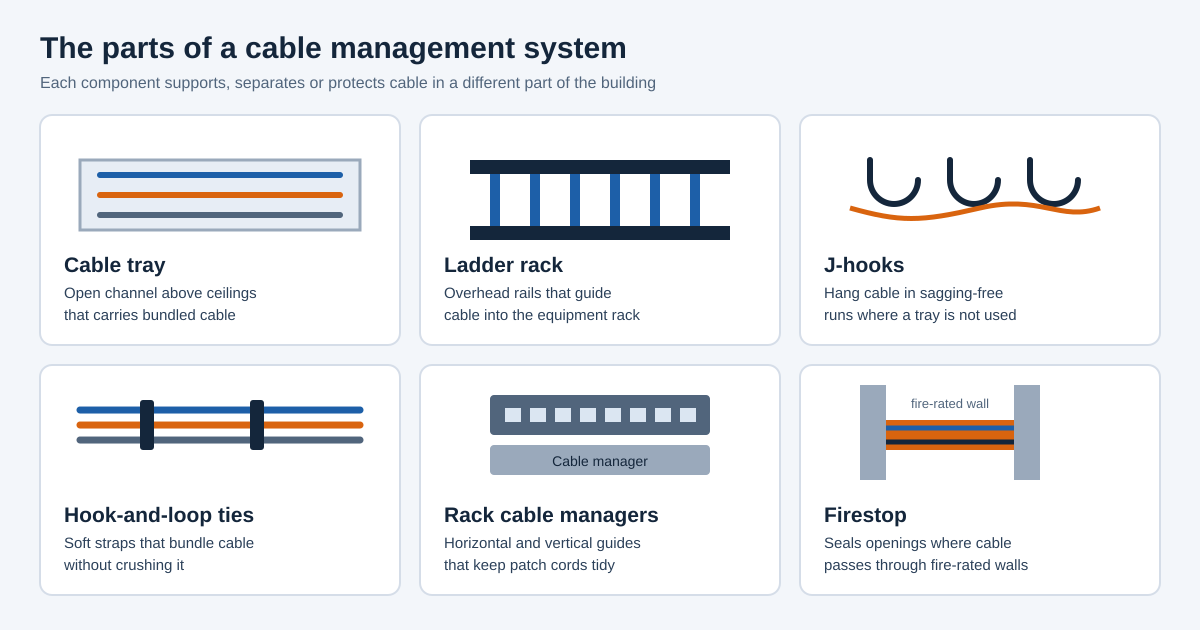
- Cable trays and wire baskets: Open channels, usually above the ceiling or along corridors, that carry large numbers of cables in a supported, organized path. They keep cable off ceiling tiles and make future additions easier.
- Ladder racks: Overhead rails that carry cable into and across the telecom room and into equipment racks. They support the weight of bundled cable and keep it above the equipment instead of draped across it.
- J-hooks and cable supports: Individual supports that hold smaller cable runs at regular intervals where a tray is not needed. They prevent sagging, which protects the cable and keeps pathways above ceilings clear.
- Hook-and-loop (Velcro) ties: Soft straps used to bundle cable without crushing it. They are preferred over tight plastic zip ties, which can squeeze the cable and affect performance, and they are easy to remove and reuse when changes are needed.
- Horizontal and vertical cable managers: Rack accessories that guide patch cords between panels and switches. They keep cords at the right bend radius, hide excess length and leave each port visible and reachable.
- Patch panels: Connection points where permanent cable ends. Using panels means the permanent cable stays untouched while short patch cords handle changes, which protects the rest of the system.
- Correct-length patch cords: Cords sized to the distance they cover, often in different colors for different uses. Excess length is the main reason racks become tangled, so a stock of correct sizes is part of good management.
- Labels and tags: Printed, durable labels at both ends of each cable and on each port, wall plate and panel. They connect the physical cable to the written records.
- Firestop materials: Approved sealing products that close openings where cable passes through fire-rated walls and floors, restoring the barrier so fire and smoke cannot spread through the opening.
- Grounding and bonding hardware: Connections that tie racks, trays and metal pathways into the building ground, which protects people and equipment and is part of a code-compliant system.
Telecom Room and Rack Cable Management
The telecom room is where good or poor cable management is most visible and where it has the biggest effect on daily operation. A well-organized room is quick to work in, easy to audit and safe to change. A disorganized one slows every task and increases the chance of a mistake. These practices apply to most rooms.
- Use patch panels between cable and switches: Permanent cable should end on a patch panel, with short patch cords connecting panel ports to switch ports. This keeps the permanent cable still and makes changes simple and low-risk.
- Place cable managers between equipment: Horizontal managers above and below each panel and switch give patch cords a clear path and hide extra length, so ports stay easy to see and reach.
- Choose patch cord lengths carefully: A cord that is only slightly longer than the distance it spans looks and works better than a coiled excess. Keep several standard lengths in stock instead of using one size for everything.
- Use color for function: Different colors for data, voice, uplinks or security help staff recognize a cord’s purpose at a glance. Pick a scheme, write it down and apply it consistently.
- Separate power from data: Keep power cords away from data cable, and route them on opposite sides of the rack where possible, to reduce interference and make tracing easier.
- Keep airflow clear: Do not let cable block vents, fans or the front of equipment. Cooling is a large part of equipment reliability in small rooms.
- Support the weight: Use ladder racks, trays and vertical managers to carry cable weight. Cable hanging from connectors strains them and leads to intermittent faults.
- Leave room for growth: Allow spare panel ports, rack space and pathway capacity so new connections do not force a rebuild.
- Keep the room clean and accessible: Avoid storing boxes or supplies in the room, keep a clear path to the rack, and keep the written records and a label printer nearby.
Cable Labeling and Documentation
Labeling and documentation are what make a cabling system manageable over years rather than months. A tidy rack is only useful if people can also tell what each cable does. A clear, consistent labeling scheme, matched to written records, turns the physical system into something anyone on the team can understand.
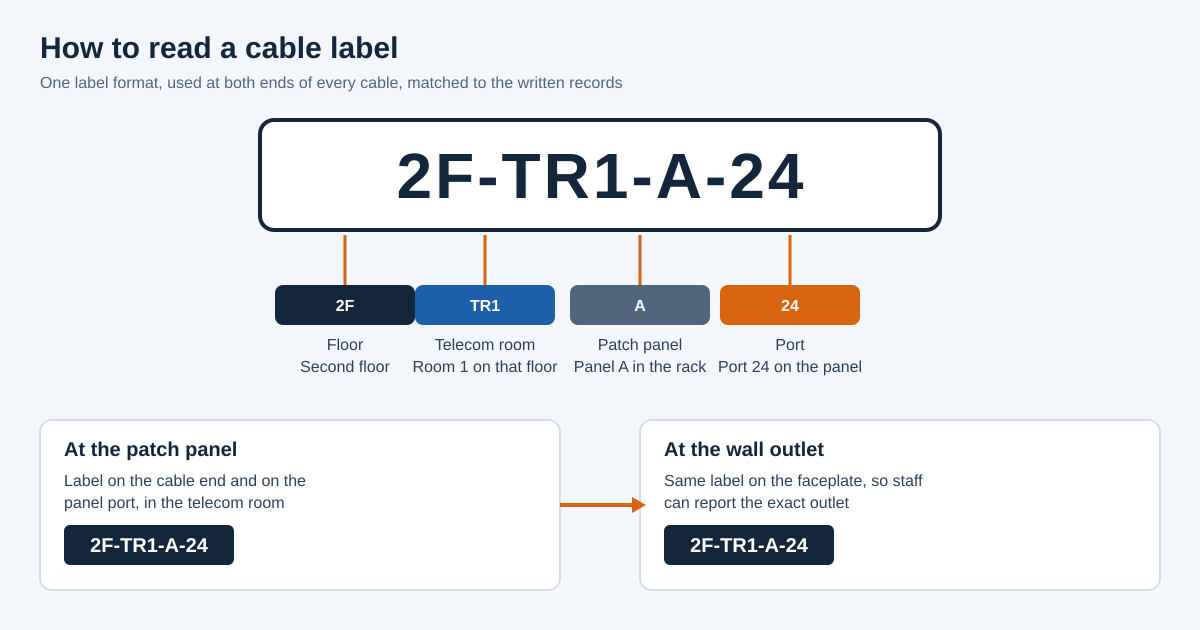
- Use one consistent scheme: Decide on a format, such as floor, room, panel and port, and use it everywhere. Mixed styles lead to confusion and errors. The ANSI/TIA-606 standard offers guidance on administration and labeling.
- Label both ends of every cable: The same identifier should appear at the patch panel and at the wall outlet, so a cable can be found from either end without tracing it through the ceiling.
- Label ports, faceplates and panels: Marking the hardware as well as the cable makes it possible to report a problem outlet by name and to find it on the panel in seconds.
- Use durable, printed labels: Machine-printed, wrap-around or self-laminating labels last and stay readable. Handwritten tape labels fade, peel and are often impossible to read later.
- Keep a port list or spreadsheet: A record of every cable, with its label, location, panel port and switch port, gives IT staff a quick reference and a baseline for changes.
- Maintain as-built drawings: Floor plans showing outlet locations and pathway routes help future contractors plan work, avoid existing cable and find hidden runs.
- Store test results with the records: Saved test results for each cable show how it performed when installed and help diagnose problems later, as described in our network installation work.
- Update records after every change: Documentation is only valuable if it stays accurate. Make updating the records part of every move, add and change, so they never drift away from the real system.
Best Practices for Organized Office Cabling
- Respect the bend radius: Every cable has a minimum bend radius. Bending tighter than that can damage the cable and reduce performance, so use gentle curves, particularly at corners and at the rear of racks.
- Do not over-tighten bundles: Use loose hook-and-loop straps so cable is held but not squeezed. Over-tight ties can change the cable’s performance and make it hard to add or remove cable later.
- Keep bundles to a sensible size: Very large bundles heat up, are difficult to work with and make tracing nearly impossible. Group cable by route or purpose, and split large bundles into smaller ones.
- Support cable along its whole route: Use trays and hangers at regular intervals instead of leaving cable on ceiling tiles, pipes or ductwork, which is also commonly prohibited by building rules.
- Leave service loops: A small, neat reserve of cable at each end allows for re-termination and minor moves without having to replace the whole run.
- Separate cable types where needed: Keep power, data and other signals on separate paths or at the distance recommended by the standards, to avoid interference.
- Use the right cable for each space: Plenum, riser and general-purpose cable have different ratings and uses. Mixing them incorrectly can cause code problems and failed inspections.
- Remove abandoned cable: Cable that no longer serves a purpose should be removed where building rules require it, or at least identified and tagged, so it does not clutter pathways or confuse future work.
- Plan pathway capacity: Size trays and conduits with room to spare. Pathways filled to the limit on day one cannot take the next addition.
- Standardize everything you can: Same patch cord lengths, same colors, same layout in every closet. Consistency means staff and contractors can work in any room without relearning it.
Our Office Building Cabling Management Process
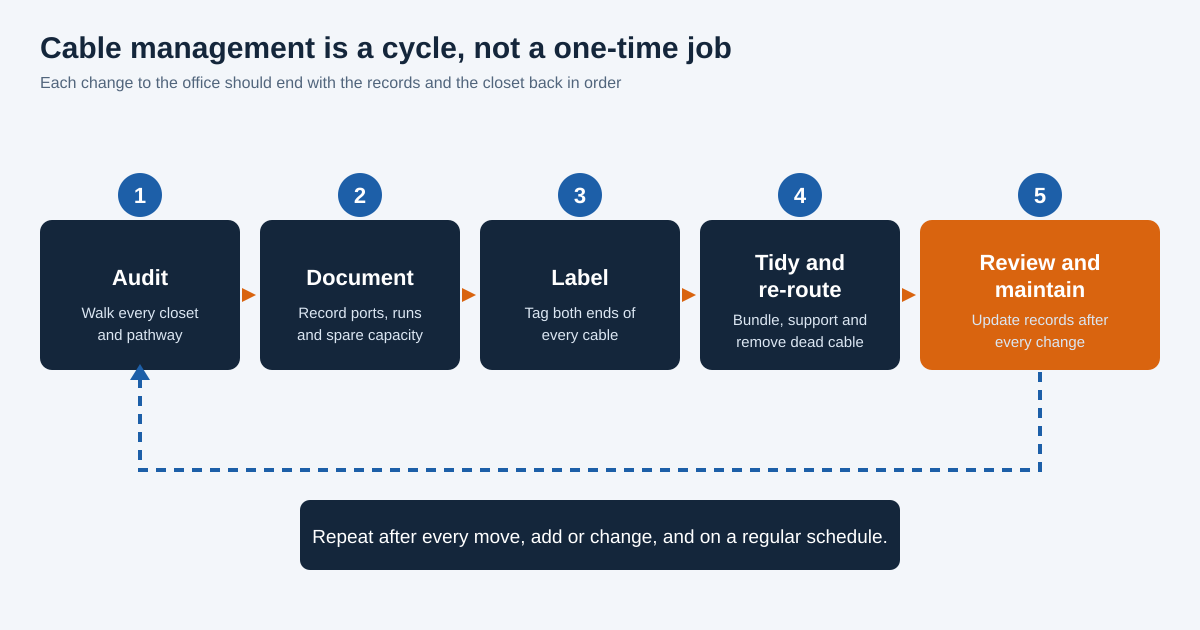
- Site survey and audit: We walk each telecom room, rack and accessible pathway to see what is installed, how it is routed and what condition it is in. We note unlabeled, damaged, abandoned and overloaded cable, and compare what we find with any existing records.
- Documentation and planning: We record what exists, identify which cables are live and which are not, and prepare a scope. The plan covers labeling scheme, new supports, rack layout, any cable to remove and the schedule, with a written quote before work starts.
- Coordination with building management: We arrange access, insurance certificates, elevator and loading dock times and any after-hours requirements. Working inside an occupied building needs agreement with building staff and with your own team.
- Cleanup and re-routing: We tidy racks, install or replace cable managers, bundle and support cable on trays or hangers, replace excess-length patch cords and fix strained or poorly routed cable. Work is staged to avoid disrupting live connections.
- Labeling: We apply the agreed labeling scheme at both ends of each cable and on panels, ports and faceplates, matching the physical system to the records.
- Removal of abandoned cable: Where appropriate and permitted, we remove cable that is no longer used, freeing pathway space and reducing clutter. Cable that must stay is identified and tagged.
- Testing and verification: We confirm that connections still work after the changes and, where needed, test cable runs to check they meet performance requirements. Anything that fails is corrected.
- Updated records and handover: You receive updated port lists, labeling key and drawings, and we walk through the finished work with you or your IT team so everyone knows how the system is now organized.
Cabling Management Challenges in NYC Office Buildings
- Older buildings with many generations of cable: Many Manhattan buildings have layers of cable from earlier tenants and earlier technologies. Sorting live cable from abandoned cable takes careful tracing and good records.
- Tight telecom spaces: Closets and equipment rooms in city buildings are often small, so space is limited and neat routing is essential. Planning rack layout and cable management carefully makes the most of a small room.
- Building rules and approvals: Many commercial buildings require insurance certificates, approved work hours and advance notice for freight elevator use. These add planning time but are standard for us.
- After-hours work: Because disruption to a business can be costly, much cleanup work is scheduled outside regular hours, in stages, so live services stay up.
- Shared risers and pathways: Risers often serve several tenants and carriers, so cable must be routed and labeled so that your cable can be identified, and so work does not disturb anyone else’s.
- Multiple tenants and carriers: The demarcation area may hold equipment from several providers. Clear labeling of what belongs to you and what belongs to the carrier prevents confusion and accidental disconnections.
- Fire-code and firestopping requirements: Penetrations through rated walls and floors must be sealed correctly, and cable rated for the space. Cleanup is a good time to find and fix missing firestopping.
- Office moves and renovations: Frequent relocations, build-outs and restacking leave cable behind. Combining cable management with relocation work keeps each move from adding to the mess.
Standards and Codes That Apply
Professional cabling management follows recognized industry standards. The Telecommunications Industry Association (TIA) publishes the ANSI/TIA-568 family for commercial building cabling, ANSI/TIA-569 for pathways and spaces, ANSI/TIA-606 for labeling and administration, and ANSI/TIA-607 for grounding and bonding. BICSI provides training, certification and design guidance used across the cabling industry. In the United States, NFPA 70, the National Electrical Code, covers communications and optical fiber cable, including cable ratings for different spaces and rules about abandoned cable. Local requirements apply in New York, so check with your building management and the New York City Department of Buildings before starting work.
What Affects the Cost of Cabling Management in NYC?
- Number of rooms, racks and cables: More equipment rooms and more cables mean more labor for auditing, re-routing and labeling. A small single-closet office is a very different job from a multi-floor building.
- Current condition of the cabling: A tangled, undocumented system takes longer to trace and fix than one that is mostly organized and only needs better labels and records.
- Materials needed: Cable managers, trays, supports, labels, patch cords and firestop products all add to the project. The amount needed depends on what is already in place.
- Amount of abandoned cable to remove: Removing old cable from ceilings and risers takes time, and access to some areas is difficult, which affects price.
- Documentation and testing scope: Full port lists, drawings and cable testing add time but give lasting value. The scope can be matched to your needs and budget.
- Building rules and work hours: After-hours or weekend work, building fees, insurance requirements and limited elevator times can add cost and schedule time.
- Live systems and risk of disruption: Working around active equipment means staging the work and taking extra care, which takes longer than working in an empty room.
- One-time project or ongoing support: A single cleanup costs differently from a recurring arrangement where we maintain labels and records as changes happen.
Because every building and every network is different, the most reliable way to get an accurate price is a site visit and a written quote. Contact us to schedule one.
Signs Your Office Needs Cabling Management
- Nobody knows what each cable does: If staff avoid touching cables for fear of causing an outage, the system is already too hard to manage and needs labeling and documentation.
- Simple changes take too long: When moving one desk takes hours of tracing, or adding a device means digging through a tangle, the cost of poor management is already being paid in time.
- The telecom room is messy: Coiled cords, blocked ports, unlabeled panels and cable hanging from equipment are warning signs that the room is due for cleanup.
- Intermittent network faults: Random drops that cannot be explained may come from damaged, strained or poorly terminated cable hidden in a bundle.
- Equipment running hot: Switches and servers that overheat in small rooms may be suffering from blocked airflow caused by cable.
- Old cable everywhere: Cable left from previous tenants, old phone systems or replaced equipment fills ceilings and risers and should be identified and removed where possible.
- Documentation is missing or wrong: If your port list and drawings do not match what is installed, or do not exist, you are relying on memory, which does not scale.
- Preparing for a move, expansion or audit: Before a relocation, a build-out or a security or compliance review, a cleanup makes the work simpler and results more reliable.
- Building management or inspection notices: Concerns about cable in ceilings, missing firestopping or abandoned cable are a clear signal to bring the system into order.
Keeping Cables Organized Over Time
- Make documentation part of every change: Whenever a cable is added, moved or removed, update the label, port list and drawing at once. Doing this each time takes minutes, while rebuilding records later takes days.
- Assign ownership: Name a person or team responsible for the telecom rooms and the records, so there is someone to say no to a quick fix that would add clutter.
- Keep supplies on hand: A stock of correct-length patch cords, labels, hook-and-loop ties and spare cable managers makes it easy to do things properly instead of improvising.
- Control access to telecom rooms: Limit who can enter and make changes, and keep a log of work. Unplanned, undocumented changes are a main reason cabling falls out of order.
- Schedule periodic reviews: A regular walk-through, for example once a year, finds problems early, confirms that records still match, and keeps small issues from turning into large ones.
- Use contractors who follow your scheme: Give any contractor the labeling standard and ask for updated records at handover, so work by different vendors stays consistent.
- Review before major changes: Before adding a floor, changing the phone system or upgrading the network, check the cabling and pathway capacity first. A short review can save a lot of rework.
- Consider an ongoing service: If you do not have in-house staff for this, an ongoing arrangement with a cabling provider can keep labels, records and rooms in order as the office changes.
Common Cable Management Mistakes to Avoid
- Using zip ties pulled tight: Over-tight plastic ties crush cable and make later changes difficult. Use hook-and-loop straps and leave them loose enough to slide.
- Leaving cable on ceiling tiles or pipes: Cable not supported by proper hangers can sag, get damaged and break building rules, and it makes later work harder.
- Using patch cords that are too long: Excess cord gets coiled and stuffed into racks, which blocks airflow and hides ports. Match cord length to the distance.
- Handwritten or taped labels: These fade, fall off and are hard to read. Use durable printed labels in a consistent format.
- Labeling only one end: A cable labeled at the panel but not at the outlet still has to be traced through the ceiling to be found. Label both ends.
- Not updating records after changes: Out-of-date documentation misleads people. Make updating the record part of the task.
- Abandoning cable in place: Leaving old cable behind adds clutter and risk. Remove it where required or identify and tag it.
- Ignoring bend radius: Tight bends at the back of racks or at corners can damage cable. Use managers and gentle curves.
- Skipping firestopping: Openings through rated walls and floors must be sealed again after cable is added or removed.
- Cleaning up without a plan: Pulling cables out of a live rack without tracing and documenting them first is how outages happen. Audit and plan before touching anything.
How to Choose a Cabling Management Provider in NYC
- Experience in occupied commercial buildings: Cleanup in a live office is different from new construction. Ask how the provider keeps live services running and how they coordinate with building management.
- A clear audit and documentation process: A good provider starts by finding out what is there and gives you records afterward. Be cautious of anyone who proposes to start pulling cables with no survey.
- Knowledge of standards and codes: The provider should understand TIA labeling and pathway guidance, cable ratings and firestopping, and be able to explain how their work follows them.
- Insurance and building credentials: Most Manhattan buildings require a certificate of insurance and approvals before work. Confirm the provider can supply them.
- Breadth across voice, data, security and AV: A provider who understands each system can organize all of them together, which avoids overlapping pathways and conflicting labels.
- A written scope and price: Ask for a detailed quote that lists what will be done, what will be delivered and what is excluded.
- Testing and handover: Make sure the work includes verification and updated records, not only physical tidying.
- Reviews and references: Look at reviews and ask for references from other offices in New York.
Want to see how other clients feel about working with us? Read and leave reviews on Yelp, or read more tips on our blog.
Why Choose New Tech Cabling for Office Building Cabling Management?
- Local knowledge of Manhattan commercial buildings: We are based in Midtown Manhattan and know the access, insurance and scheduling requirements buildings commonly set.
- Organized, documented results: We aim to leave you with a tidy system and the labels and records to keep it that way, so your team can support it with confidence.
- Experience across the whole low voltage system: One team can organize data, voice, security and AV cabling together, and can extend or rebuild it through our low voltage cabling installation service when needed.
- Careful work in live offices: We plan the work so your business keeps running, using staged and after-hours work where required.
- Transparent quotes and clear communication: You receive a written scope and price before work begins and stay informed on schedule and progress.
- Support for future moves and changes: When your team grows or relocates, we can keep the system organized as it changes.
Cabling Management Service Areas in New York
New Tech Cabling is located in the heart of Midtown Manhattan, at the corner of 5th Avenue and 34th Street. We serve businesses and buildings throughout Manhattan, including Midtown, the Financial District, Chelsea, SoHo, Tribeca, Hudson Yards and the Flatiron District, as well as Brooklyn, Upper Manhattan, Jersey City, Hoboken and Union City.
Frequently Asked Questions About Office Building Cabling Management
What is office building cabling management?
It is the practice of routing, supporting, labeling and documenting all cables in a building so the system is safe, organized and easy to support, covering telecom rooms, racks, pathways, risers and work areas.
Why is cable management important in an office?
It speeds up troubleshooting, protects cable and connections, improves airflow in equipment rooms, lowers the cost of moves and changes, and helps meet building and fire-code requirements.
How much does cabling management cost in NYC?
Cost depends on the number of rooms and cables, their condition, materials, documentation and testing needs, building rules and work hours. A site visit and written quote is the most reliable way to get an accurate figure.
Can you clean up cabling without shutting down the network?
In many cases yes. We audit first, then stage the work and schedule sensitive steps after hours so live services are protected. Some steps may need a short planned interruption, which we coordinate with you in advance.
What is the best way to label network cables?
Use one consistent scheme, such as floor, room, panel and port, label both ends of every cable and the ports and faceplates, use durable printed labels and keep records that match. ANSI/TIA-606 provides guidance.
Should abandoned cable be removed?
Often yes. Abandoned cable clutters pathways and may be addressed by electrical and building codes. Requirements depend on the building and local rules, so confirm with building management and your installer.
Are Velcro ties better than zip ties?
Generally yes for network cable. Hook-and-loop straps hold cable without crushing it and are easy to adjust, while tightly pulled plastic ties can damage cable and make changes difficult.
How often should cabling be reviewed?
A yearly walk-through is a sensible minimum, along with a review after any move, expansion or major equipment change, so labels and records stay accurate.
Do you provide documentation after the work?
Yes. We provide updated labeling, port lists and drawings so your team has current records of what is installed and where.
Which areas do you serve?
We serve Manhattan, Brooklyn, Upper Manhattan, Jersey City, Hoboken and Union City.
Request a Cabling Management Quote in NYC
Ready to bring order to your cabling? Contact New Tech Cabling for office building cabling management in NYC. Our team will review your telecom rooms and pathways, recommend the right plan and deliver clean, labeled and documented work.
Call (212) 537-5965 | Schedule a consultation
Email: info@newtechcabling.com
Hours: Monday to Friday, 7:00 am to 6:00 pm
Location: 5th Avenue and 34th Street, Midtown Manhattan, New York
Learn more: Cable management | All services | IT room build-out | New Tech Cabling home
Recent Comments