
PoE Network Installation NYC & Manhattan
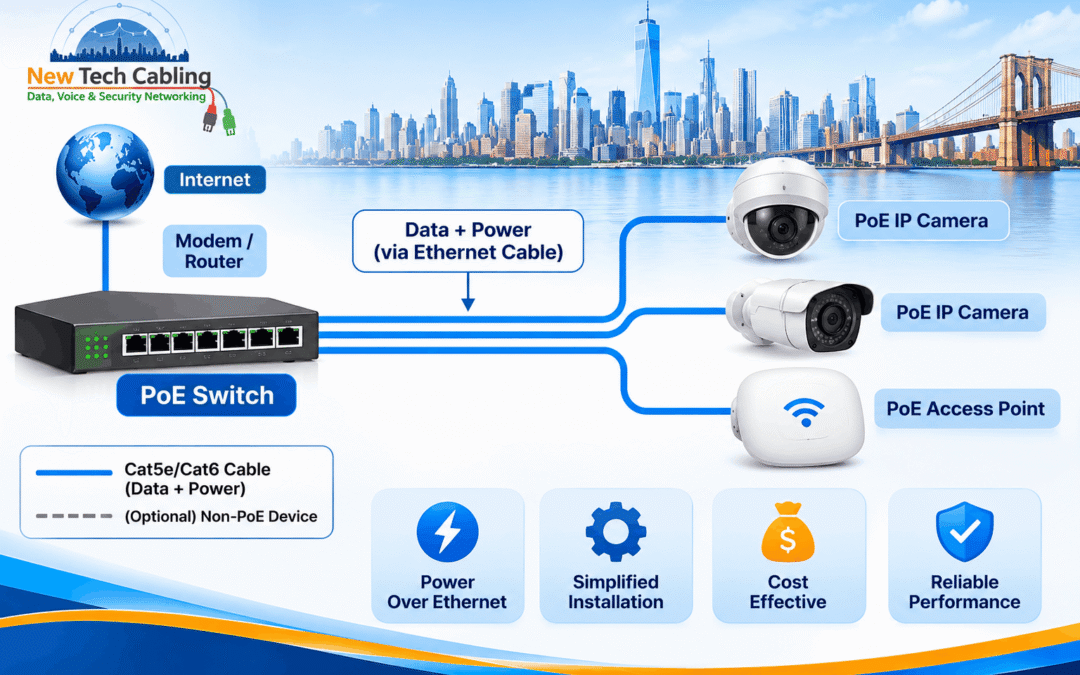
PoE network installation NYC offices choose often comes down to one simple idea: run one cable to each device instead of two. Instead of pulling network cable and then hunting for a power outlet near every access point, camera and phone, Power over Ethernet sends data and power down the same cable. In a Manhattan office, where ceilings are tight and every extra electrical job adds time, that can make an installation faster, tidier and easier to change later.
This guide explains what PoE is, how it simplifies office network installation, which PoE standard suits which devices, how to plan the power budget and cabling, and what to look for in a provider. It is written for office managers, IT managers and property managers who want the setup to work on the first day and stay easy to maintain.
In this guide
What Is Power over Ethernet?
Quick answer: Power over Ethernet (PoE) delivers DC electrical power to a device over the same copper ethernet cable that carries its data, so the device does not need a separate power adapter or outlet. The power comes from a PoE-capable switch or a PoE injector.
PoE does not make the data connection any faster. As Cisco’s overview of Power over Ethernet puts it, what it changes is where devices can be placed. A ceiling access point, a camera above a doorway or a phone on a reception desk no longer has to sit near an outlet, because the network cable already brings what the device needs.
How PoE Simplifies Office Network Installation
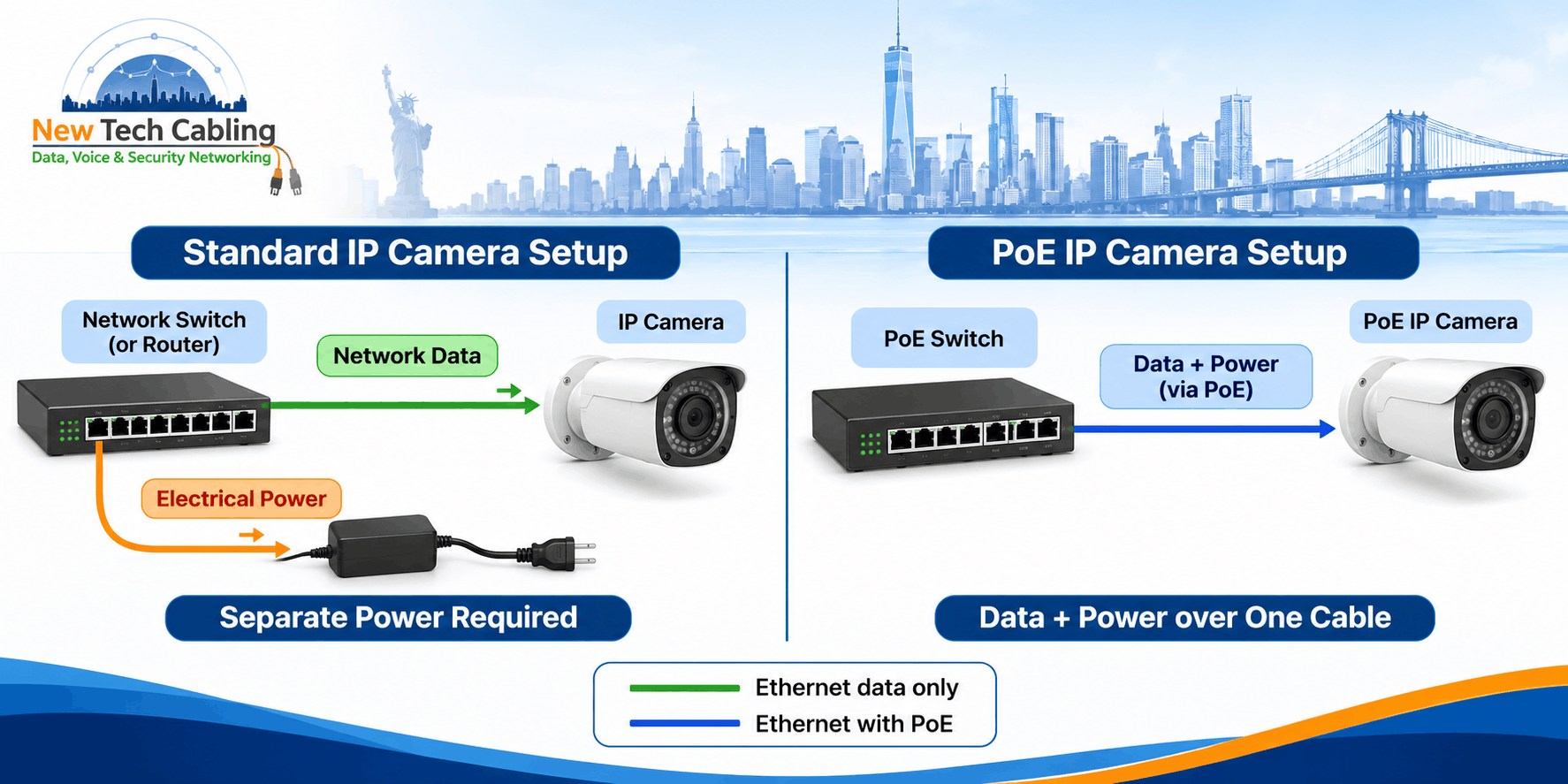
Traditional installs have two jobs for every device: a network drop and a power source. PoE combines them. In practice, that changes an installation in several ways:
- One cable per device. Fewer cables above ceilings and behind walls means less to install, label and trace later.
- No outlet needed at the device. Access points, cameras and door readers can go exactly where they work best, not where an outlet happens to be.
- Easier moves and changes. Repositioning a device means moving one cable, not coordinating a cable and a power source.
- Central power and backup. Putting the PoE switch on a UPS can keep many devices running through a power cut, instead of backing up each one separately.
- Remote resets. A frozen access point or phone can be restarted by cycling power on its switch port, with no one climbing a ladder.
As a result, PoE tends to shorten the installation itself and simplify the changes that follow. However, it only works well when the power budget, the cable and the switch are planned together, which is covered below.
PoE Standards and Power Levels
Not all PoE is the same. Each IEEE standard raised the amount of power available, and each is backward compatible with the earlier ones. Power is measured at two points: what the switch port sends, and what actually reaches the device after some is lost in the cable.
| Standard | Also called | Max power from switch port | Max power at device | Typical office devices |
|---|---|---|---|---|
| IEEE 802.3af | PoE, Type 1 | 15.4 W | 12.95 W | VoIP phones, basic IP cameras |
| IEEE 802.3at | PoE+, Type 2 | 30 W | 25.5 W | Wi-Fi access points, many IP cameras |
| IEEE 802.3bt Type 3 | 4-pair PoE | 60 W | 51 W | High-power access points, room panels, small displays |
| IEEE 802.3bt Type 4 | 4-pair PoE | 90 W | 71.3 W | Monitors, kiosks, LED lighting, sensors |
The IEEE 802.3 standard defines ethernet and its PoE amendments, and the Ethernet Alliance’s overview of 802.3bt explains how the higher-power Type 3 and Type 4 options work over all four cable pairs. In short, the right standard depends on the most power-hungry device on each port.
Which Office Devices Use PoE?
- VoIP phones are the classic PoE device and usually need the least power.
- Wireless access points mounted on ceilings are one of the strongest reasons to choose PoE.
- IP security cameras often sit far from outlets, such as in stairwells, entrances and parking areas.
- Door access readers and controllers can be powered through the same cable that carries their data.
- Room panels, displays and digital signage can use higher-power PoE, which suits meeting spaces. Our guide to conference room cabling in NYC covers how these fit into a room build.
- Sensors and smart lighting are increasingly powered over ethernet in newer buildouts.
The PoE Network Installation Process, Step by Step
- List every device and its power need. Note the PoE standard or wattage each one requires.
- Add up the power budget. Work from the total watts the devices need, plus some room for growth, not from the number of ports.
- Plan routes and lengths. Each run must stay within 100 meters, and routes should avoid sources of interference.
- Choose the cable. Cat6 or Cat6A is a safe choice for most new PoE work. Our overview of ethernet cabling installation in NYC explains what a proper install includes.
- Select and place the PoE switches. Position them in the telecom closet so runs reach every device without exceeding the length limit.
- Pull, terminate and label every run. Clear labels make later changes quick.
- Test every run. Testing proves the cable performs as needed. See our article on network cable testing in NYC for what good testing looks like.
- Connect, configure and document. Record which port powers which device, and connect the switch to a UPS where backup matters.
PoE vs. Separate Power: What Changes?
| Factor | Separate power and network | PoE |
|---|---|---|
| Cables per device | Two: a network cable and a power adapter | One network cable |
| Outlet near the device | Required | Not required |
| Moving a device | Move or add both a cable and a power source | Move one cable |
| Backup power | Each adapter needs its own backup | One UPS on the switch can cover many devices |
| Restarting a stuck device | Unplug and replug it by hand | Cycle power on the switch port |
| Planning needed | Network drop and outlet location | Network drop plus a power budget |
The last row matters. PoE removes some work, but it adds one planning task that separate power does not have: making sure the switch can actually supply every device.
Planning Power and Cabling for PoE
Count watts, not ports
A PoE switch has a total power budget, and many switches cannot give every port its maximum power at the same time. For example, a 24-port switch may have enough budget for a typical mix of phones and access points but not for 24 high-power devices. Therefore, add up what the devices need and compare it with the switch’s stated PoE budget.
Mind the cable and the distance
PoE runs over standard twisted-pair cable up to 100 meters, and the standards allow for some power being lost along the way. Higher-power PoE puts more current through the cable, so cable quality matters more. Cat5e is generally the minimum, while Cat6 or Cat6A gives more headroom, especially for long runs and large bundles where heat can build up.
Match the cable rating to the space
Devices mounted in ceilings often mean cable running through air-handling spaces, where fire-rated cable is required. Our guide to plenum-rated cable for NYC office buildings explains how that works.
Common PoE Problems and How They Get Fixed
| Problem | What you notice | Typical fix |
|---|---|---|
| Switch out of PoE budget | Some devices will not power on, or others restart when new ones connect | Add budget with a larger switch or power supply, or spread devices across switches |
| Cable too long or poor quality | Devices reboot, drop off or run unreliably | Shorten the route, re-terminate, or replace the cable |
| Port gives less power than the device needs | Device runs in reduced mode or will not start | Use a higher-power port, switch or injector |
| Damaged or badly terminated cable | Power or data cuts in and out | Test the run, re-terminate or replace the damaged section |
| Mismatched or non-standard equipment | Devices do not power up as expected | Use standards-based PoE equipment and check device specifications |
When a PoE device keeps dropping, the cable is a common suspect. Our guide to ethernet cable troubleshooting in NYC walks through how to isolate the fault. Meanwhile, a quick power budget check on the switch often rules out the simplest cause.
Planning a PoE network installation?
Tell us about your devices, floor layout and timeline. We can help you work out the power budget, cable and switch placement before any cable is pulled.
Why Professional PoE Installation Matters
PoE looks simple from the outside, which is why mistakes tend to appear later. A switch that is too small, a long run that was never tested or an unlabeled cable can all turn into recurring faults. A professional installation avoids those problems in a few specific ways:
- The power budget is sized correctly, with room for devices added later.
- Every run is tested, so you know the cable can carry both data and power.
- Cable choice fits the building, including ceiling and riser requirements.
- Everything is labeled and documented, so the next change takes minutes, not hours.
In addition, getting it right once is almost always cheaper than reopening a ceiling to fix a run that never worked properly.
Ready to talk through your PoE project?
Whether it is a new office, a floor refit or an upgrade to your wireless and camera network, we can help you plan the installation.
PoE Network Installation in Manhattan and Other NYC Buildings
Manhattan buildings add their own conditions to PoE work. Tall buildings often mean cable runs between a floor’s telecom closet and ceiling devices that are close to the length limit. Tenant fit-outs can leave limited ceiling access, and many properties set rules for working hours, insurance paperwork and freight elevators. As a result, the layout of the switches and the routes should be settled before work begins.
Brooklyn and Queens have many converted industrial buildings with older cable paths, while the Bronx and Staten Island often involve smaller commercial properties where one switch serves a whole space. New Tech Cabling supports businesses in Manhattan, Brooklyn, Queens, the Bronx and Staten Island.
How to Choose a PoE Network Installation Provider in NYC
Plenty of contractors can run cable, but PoE needs a little more planning. Before you hire, ask:
- Will they calculate the power budget? They should be able to show how the switch covers every device.
- Which cable do they recommend and why? The answer should reflect your device power levels and run lengths.
- Do they test every run and provide the results? Written test records are standard practice.
- Do they label and document ports? You should know which port powers which device.
- Do they know how to work in New York buildings? Access rules and after-hours work are routine here.
- Is the scope clear in writing? Know what is included before work starts.
New Tech Cabling works on structured cabling, ethernet and low voltage projects for New York businesses. These are fair questions to ask us or any other contractor, and the answers should be specific.
Frequently Asked Questions About PoE Network Installation in NYC
What is Power over Ethernet (PoE)?
Power over Ethernet is a technology that delivers DC electrical power to a device over the same copper ethernet cable that carries its data. The device does not need a separate power adapter or a nearby outlet, because the power comes from a PoE switch or a PoE injector.
Does PoE need a special type of cable?
No special cable type is needed, because PoE runs over standard twisted-pair ethernet cable. Cat5e is generally the minimum, and Cat6 or Cat6A gives more headroom for long runs, higher power levels and large cable bundles.
How far can a PoE cable run?
A PoE link follows the same 100-meter (328-foot) limit as standard ethernet over twisted pair. The standards allow for some power being lost along the cable, so the device receives slightly less than the switch sends.
How much power can PoE deliver?
From the switch port, IEEE 802.3af delivers up to 15.4 W, 802.3at (PoE+) up to 30 W, and 802.3bt up to 60 W (Type 3) or 90 W (Type 4). The device itself receives somewhat less because of loss in the cable.
Can PoE power Wi-Fi access points and security cameras?
Yes. Wireless access points, IP cameras, VoIP phones and door access readers are some of the most common PoE devices in offices. Check each device’s power requirement against the PoE standard of the switch port it will use.
What happens to PoE devices during a power outage?
If the PoE switch is connected to an uninterruptible power supply (UPS), the devices it powers can keep running until the UPS battery runs out. Without a UPS, they lose power when the switch does.
Getting PoE Network Installation in NYC Right
Power over Ethernet makes an office network simpler to install and simpler to change, as long as the planning is done up front. Count the watts, choose the cable and switch to match, test every run and keep the records. If you are setting up a new office, refitting a floor or adding access points and cameras, a short conversation early on can save a lot of rework later.
Talk to our team about your PoE installation
Share your devices, layout and timeline, and we will help you plan the next step.
📞 Phone: (212) 537-5965
📧 Email: info@newtechcabling.com
🌐 Website: newtechcabling.com
Recent Comments