Fiber Optic Installation in NYC for Businesses and Buildings
Cloud apps, video meetings, backups, security video and voice calls all push more data through New York offices every year, and copper cabling alone has limits on distance and speed. That is why more businesses are turning to professional fiber optic installation in NYC: glass cabling that moves huge amounts of data between floors, equipment rooms and buildings with very little loss. New Tech Cabling, based in Midtown Manhattan, helps New York businesses plan, install, test and document the cabling their networks depend on.
This guide explains what fiber optic installation involves, how single-mode and multimode fiber differ, where fiber is used inside a commercial building, what makes fiber work in New York buildings different and what affects the cost. You can also browse our full list of network cabling services.
In this guide
- What fiber optic installation is
- Why NYC businesses choose fiber
- Single-mode vs. multimode fiber
- Where fiber is used in a commercial building
- Connectors, splicing and termination
- Fiber installation challenges in NYC buildings
- Our fiber installation process
- Fiber testing and certification
- Standards and codes
- What affects the cost
- Signs your business needs fiber
- Common fiber installation mistakes to avoid
- How to choose a fiber optic installer in NYC
- Service areas
- Frequently asked questions
What Is Fiber Optic Installation?
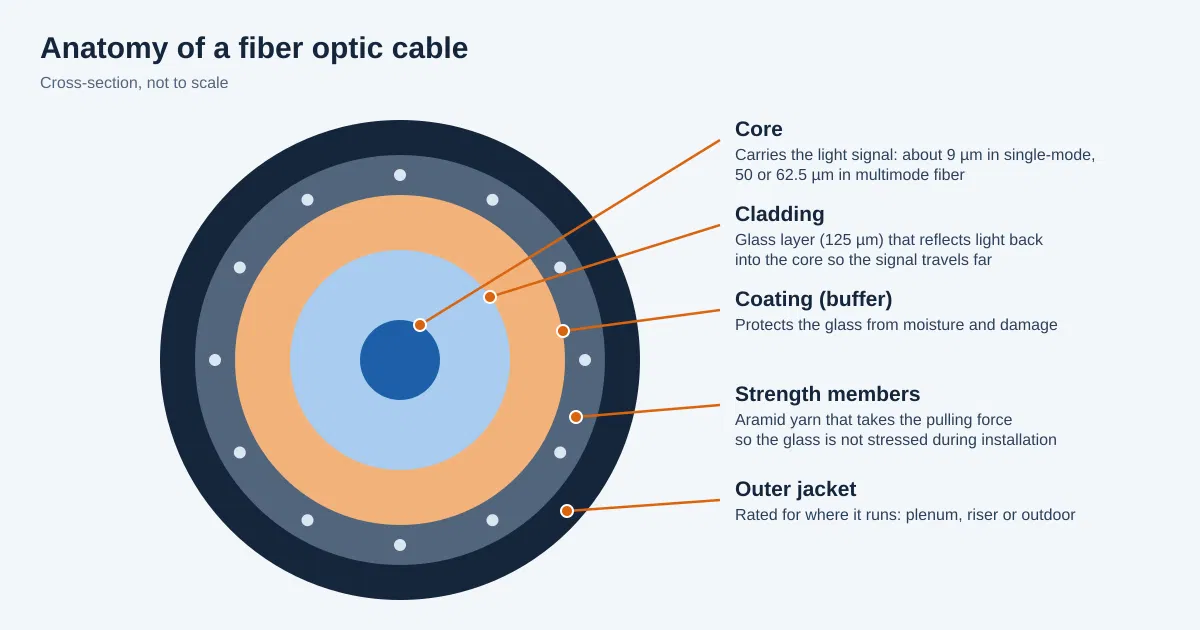
Fiber optic installation is the process of planning, routing, terminating, testing and documenting cables made of thin strands of glass that carry data as pulses of light. Unlike copper Ethernet, fiber is not affected by electrical interference, and it can carry far more data over much longer distances. In a commercial building it is most often used for the backbone, the main links that connect floors, telecommunications closets, server rooms and sometimes separate buildings.
A proper fiber installation is more than pulling cable. It includes choosing the right fiber type and strand count, routing the cable without bending or stressing the glass, terminating each strand with connectors or splices, cleaning and inspecting every connection and testing every link before handover. Fiber is less forgiving than copper, so careful workmanship matters.
Why New York Businesses Choose Fiber Optic Cabling
- Far more bandwidth: Fiber can carry much more data than copper, so a backbone installed today can handle faster equipment for many years without being replaced.
- Longer distances: Copper Ethernet is limited to about 100 meters per run, while fiber can reach hundreds of meters or many kilometers depending on the type, which suits tall buildings, large floor plates and campus links.
- Immunity to electrical interference: Fiber does not pick up noise from power lines, elevators, lighting or heavy equipment, which makes it dependable in dense Manhattan buildings full of electrical systems.
- Better security: Fiber does not radiate signals the way copper can, and tapping a fiber link is harder to do unnoticed, which helps firms that handle sensitive client data.
- Smaller, lighter cable: Fiber cable takes less space in crowded risers and conduits, and one cable can carry many strands, which matters when pathways in older buildings are limited.
- Room to grow: Spare strands can be installed now at low extra cost and lit up later, so adding capacity does not mean another construction project.
Single-Mode vs. Multimode Fiber
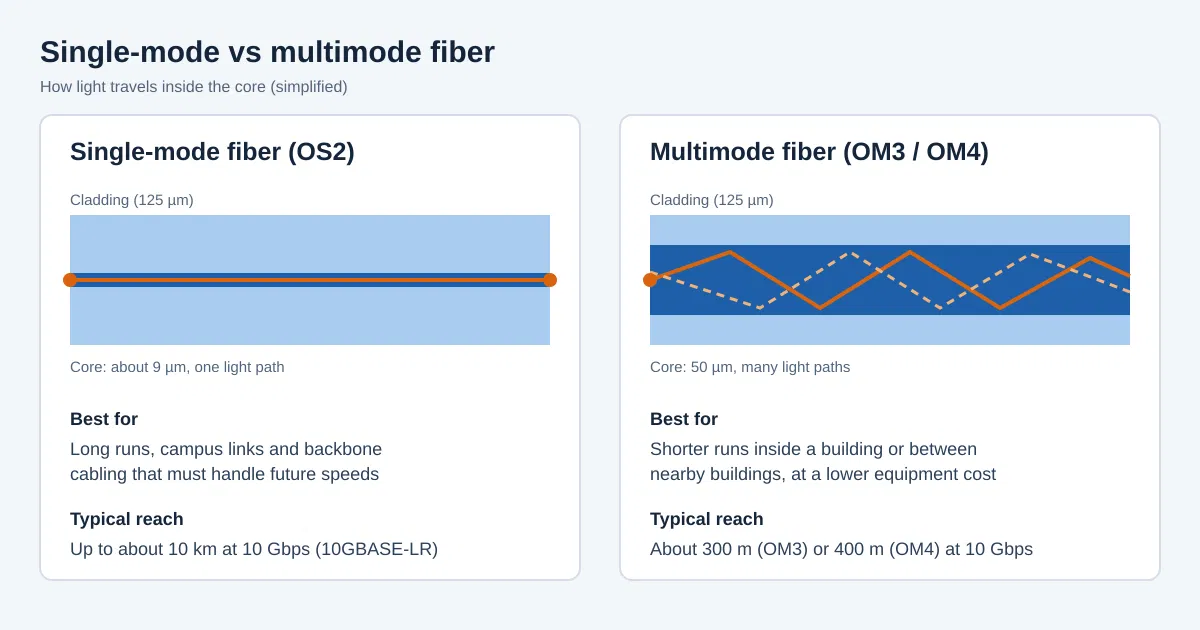
There are two main kinds of fiber, and choosing between them is one of the first decisions in any project. Single-mode fiber has a very thin core that lets light travel in a single path, which allows very long distances. Multimode fiber has a wider core that carries light in many paths, which suits shorter runs and usually costs less for the equipment at each end.
| Fiber type | Core size | Typical reach at 10 Gbps | Best for |
|---|---|---|---|
| Single-mode (OS2) | About 9 µm | Up to about 10 km | Long runs, campus links, carrier connections and future-proof backbones |
| Multimode OM3 | 50 µm | About 300 m | Backbone runs inside a building |
| Multimode OM4 | 50 µm | About 400 m | Longer in-building runs and higher-speed links |
These are typical figures for common 10 Gbps standards, and reach is shorter at higher speeds. Many New York projects pick single-mode for the backbone because it covers any distance and any future speed, and use multimode where the runs are short and the budget favors it. For a technical reference, download our white paper on cable and wiring types.
Where Fiber Is Used in a Commercial Building
Fiber usually forms the backbone, while copper Cat6 or Cat6A still serves the desks. Fiber does not carry electrical power, so devices that rely on Power over Ethernet, such as phones, cameras and access points, connect by copper from the nearest closet.
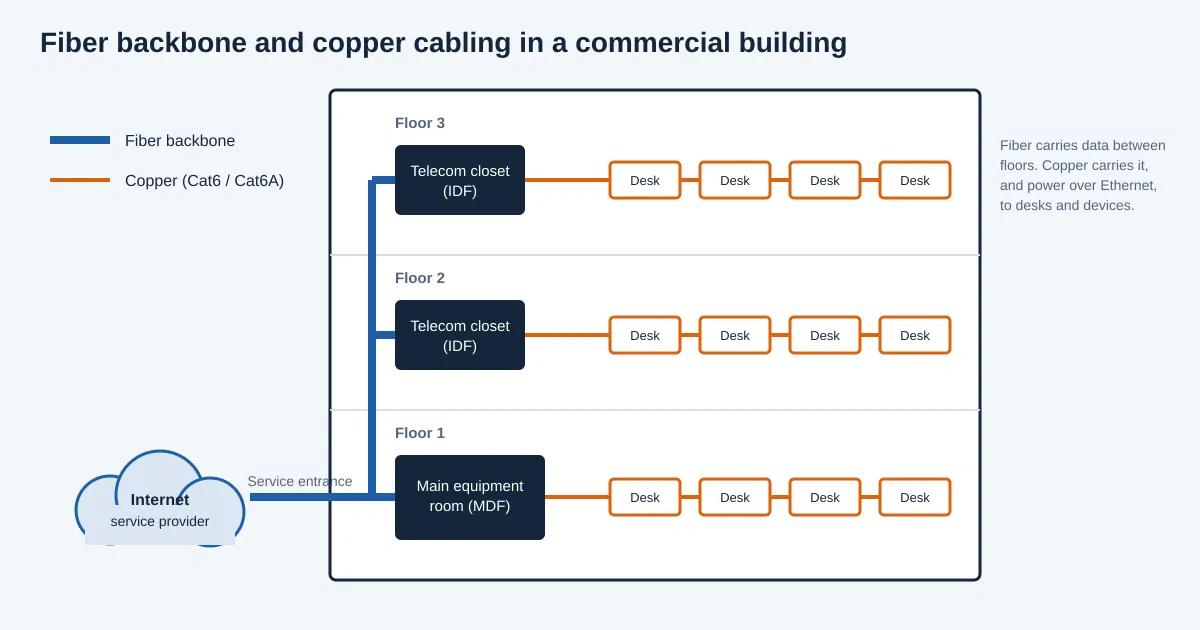
- Riser backbone between floors: Fiber runs up the building riser from the main equipment room to the telecom closet on each floor. This is the most common use, and it keeps every floor connected at full speed without the distance limits of copper.
- Links between telecom closets and server rooms: Servers, storage and core switches exchange large amounts of data, so fiber links between these rooms keep applications fast and backups quick. See our IT room build out and data center build out services.
- Connections between buildings: Offices spread across a campus or neighboring buildings can be joined with outdoor-rated fiber. It carries data safely between buildings without the electrical grounding concerns that copper can raise.
- Service entrance from the internet provider: Many business internet services arrive by fiber and end at a demarcation point in the building. Planning the path from there to your equipment room avoids delays when service goes live.
- High-bandwidth workspaces: Video editing suites, trading desks and labs that move very large files sometimes run fiber closer to the work area, or all the way to the device, where copper cannot keep up.
- Security and AV backbones: Camera systems and conference room equipment generate heavy traffic, and a fiber backbone keeps that traffic from slowing the rest of the network. See our security systems cabling and conference room design build out services.
Fiber Connectors, Splicing and Termination
Every strand of fiber has to be terminated so it can connect to equipment. This work needs clean conditions, special tools and trained technicians, because a speck of dust or a poor splice can weaken a link.
- LC connectors: Small, push-pull connectors that are common on modern switches and patch panels. Their size allows many connections in a small space, which is useful in crowded racks.
- SC connectors: Larger square connectors that snap in and out easily. They are still common on older equipment and some carrier handoffs.
- ST connectors: Twist-lock connectors found mostly on older installations. You may meet them when upgrading or reusing existing fiber.
- Fusion splicing: A splicing machine melts two fiber ends together, giving a permanent joint with very low signal loss. It is the usual method for pigtails and for repairs and is the best choice for quality.
- Mechanical splicing: A quicker method that holds two fiber ends in alignment with a gel or clamp. It needs less equipment but usually has higher loss, so it is used for temporary or repair work.
- Patch panels and fiber enclosures: Terminated fiber ends in a panel, and short patch cords connect the panel to equipment. This protects the permanent cable and lets changes be made without touching the backbone.
Fiber Optic Installation Challenges in NYC Buildings
- Building rules: Many buildings require certificates of insurance, approved contractors and advance scheduling. Missing paperwork can keep a crew out of the building, so a contractor who handles this early keeps your project on schedule.
- Freight elevators: Cable reels, tools and equipment often have to be booked through building management, with limited time slots. Planning deliveries around those slots keeps the work moving.
- Shared risers and shafts: Fiber between floors often passes through building-controlled risers, where space is limited and access may need landlord approval. Early coordination with property management avoids delays.
- Older buildings: Pre-war construction can have thick walls, crowded conduits and abandoned cable, so pathways need careful surveying before fiber is pulled.
- Bend radius and pulling tension: Fiber can be damaged by tight bends or too much pulling force, and tight Manhattan pathways make this a real risk. Experienced crews pull with controlled tension and use proper supports.
- After-hours work: Some buildings only allow disruptive work in the evening or on weekends, which affects scheduling and sometimes cost but keeps tenants undisturbed.
- Fire-rated spaces and cable ratings: Fiber in air-handling spaces generally needs a plenum rating, riser shafts call for riser-rated cable, and openings through fire-rated walls and floors must be firestopped under local codes.
Our Fiber Optic Installation Process
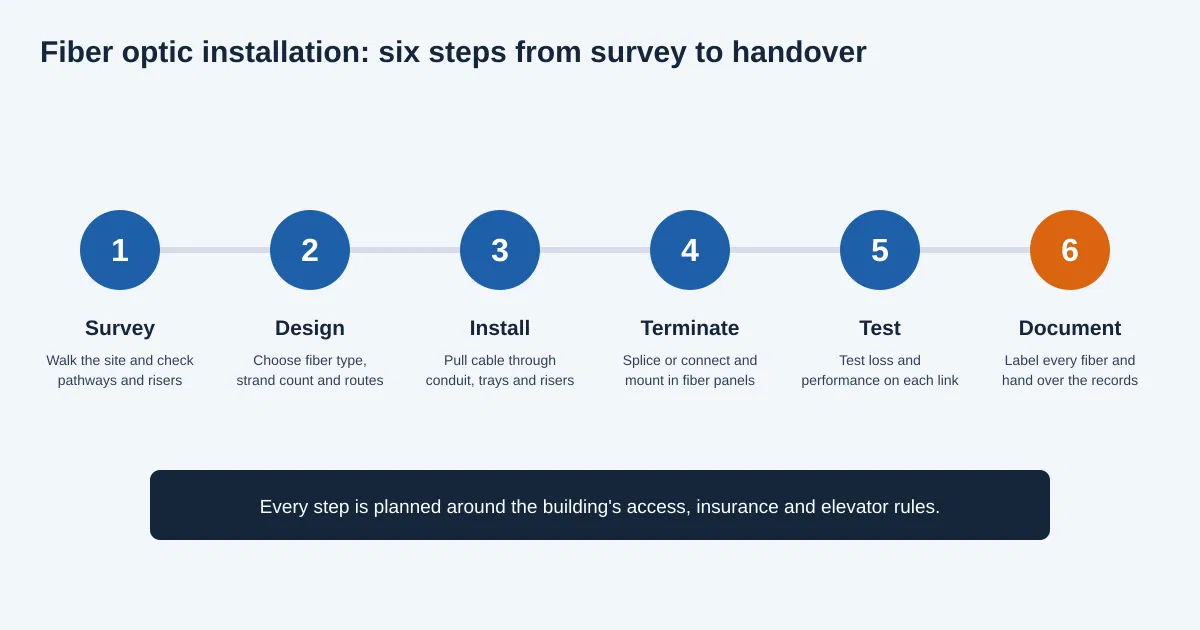
- Site survey and consultation: We visit your space to look at pathways, risers, equipment rooms and distances, and we ask how much bandwidth you need today and how much you expect to need later, so the design fits your business.
- Fiber design and quote: You receive a clear plan showing the fiber type, strand count, routes, panels and equipment locations, with a transparent written quote so you know the scope and cost before work begins.
- Building coordination: We work with your property manager on access, insurance paperwork, freight elevator use, riser access and scheduling. Handling these early helps avoid delays on installation day.
- Cable installation: Our technicians route fiber through conduit, trays and risers with controlled pulling tension and proper bend radius, and support it neatly so the glass is protected.
- Termination and splicing: Each strand is spliced or terminated and mounted in a fiber panel. Connectors are cleaned and inspected before they are mated, because dirt is a common cause of fiber problems.
- Testing: Every fiber link is tested for signal loss and performance before handover. Any link that does not meet the requirement is corrected before the job is considered complete.
- Labeling and documentation: Every fiber, panel port and cable is labeled, and you receive test results and records of what was installed. We can also help with later changes as your business grows.
For larger projects, our low voltage cabling design-build, low voltage cabling installation and project management services keep planning, installation and scheduling under one team.
Fiber Optic Testing and Certification
Testing is how you know a fiber link will work. Skipping it is one of the costliest shortcuts, because faults often only show up when the network is busy. Professional installers test every link and give you the results.
- Visual inspection: Each connector end is checked under a magnifier before it is mated. Scratches, dirt or damage here can cause loss and are easy to fix at this stage.
- Connector cleaning: Fiber ends are cleaned before every connection. Dirty connectors are one of the most common reasons for poor fiber performance, so cleaning is part of every step.
- Insertion loss testing: A light source and power meter measure how much signal is lost from one end of the link to the other. The result is compared with the allowed loss budget for the link.
- OTDR testing: An optical time-domain reflectometer sends pulses along the fiber and shows where loss or reflection occurs, such as at splices, connectors or bends. It is especially useful on longer runs and for tracing faults.
- Polarity and labeling checks: Each fiber pair is checked to be connected the right way round and matched to its label, which prevents hard-to-find problems at turn-up.
- Test records: Results are saved and handed over with the documentation, so your IT team has a baseline to compare against if a problem appears later.
Standards and Codes That Apply
Professional fiber installation follows recognized standards. Organizations such as BICSI and the Telecommunications Industry Association (TIA) publish guidance that structured cabling design is built on, and the Fiber Optic Association (FOA) offers training and reference material on fiber installation and testing. Electrical codes such as NFPA 70, the National Electrical Code, cover optical fiber cable and raceways in buildings. In practice this affects cable ratings in ceilings and risers, firestopping where cable passes through rated walls and how pathways are built. Local requirements may add more, so check with your building management and the New York City Department of Buildings.
What Affects the Cost of Fiber Optic Installation in NYC?
- Fiber type and strand count: Single-mode and multimode differ in cable and equipment cost, and more strands cost more. Adding spare strands is usually cheap compared with running new cable later.
- Length and difficulty of the routes: Longer runs use more cable and time. Crowded risers, hard ceilings, masonry walls and long vertical pulls take more labor, so similar links can cost very different amounts in different buildings.
- Number of terminations and splices: Each strand needs a connector or splice, and each must be cleaned, inspected and tested. A higher count means more labor and testing time.
- Cable rating and type: Plenum-rated, riser-rated and outdoor-rated fiber are priced differently, and armored or indoor/outdoor cable may be needed in some paths.
- Panels, enclosures and equipment room work: Fiber panels, racks, cable management and any room upgrades add to the total, especially for a new equipment room.
- Testing and documentation level: More detailed testing, such as OTDR traces on every link, takes more time but gives you stronger records.
- Building rules, after-hours work and insurance: Work limited to evenings or weekends, insurance certificates and booked elevator time all add scheduling effort and sometimes cost.
- Schedule pressure: A tight deadline may need more technicians or longer hours, so starting early helps control cost.
The most reliable way to get an accurate figure is a site survey followed by a detailed written quote. Contact our team to start that conversation.
Signs Your Business Needs Fiber Optic Cabling
- Slow transfers between floors or servers: If large files, backups or databases crawl between rooms, the backbone may be the bottleneck, and fiber removes that limit.
- Copper runs that are too long: Copper stops working reliably beyond about 100 meters, so far-apart rooms or buildings call for fiber.
- Interference problems: Links near elevators, heavy machinery or dense power cabling can suffer errors that fiber avoids.
- Outgrowing 1 Gbps links: Teams that move large files, run video or host their own servers often need 10 Gbps or more between key points, which fiber handles easily.
- Plans for faster internet service: A multi-gigabit or fiber internet plan is wasted if the wiring behind it cannot carry the speed.
- Crowded or overheating copper bundles: Thick copper bundles in risers and trays take space and can be replaced by a few small fiber cables.
- Multiple buildings or a campus: Joining separate buildings is a classic job for outdoor-rated fiber.
Spotting two or three of these signs is a good reason to book an assessment. A professional can test your existing cabling and tell you whether fiber is worth adding now.
Common Fiber Optic Installation Mistakes to Avoid
- Skipping spare strands. Pulling cable again later costs far more than adding extra strands now, so plan for growth.
- Choosing the wrong fiber type. Mixing single-mode and multimode, or picking OM3 for a link that will need higher speeds, can force a costly redo.
- Ignoring bend radius and pulling tension. Tight bends and hard pulls can damage the glass in ways that only appear later as loss or failure.
- Leaving connectors dirty. A speck of dust can ruin a link, so every connector should be cleaned and inspected before it is mated.
- Skipping testing. Untested fiber can hide faults that surface under load. Testing every link catches problems while they are easy to fix.
- No labeling or documentation. Unlabeled fiber turns every future change into guesswork, while clear records save time and cost.
- Ignoring building rules. Missing insurance paperwork, riser approvals or elevator bookings can delay a project, especially in Manhattan.
- Using the wrong cable rating. Cable in the wrong rating for ceilings or risers can fail inspection and force rework.
How to Choose a Fiber Optic Installer in NYC
- Ask about fiber experience. Ask how many fiber projects they have done, which fiber types they work with and whether they can show similar jobs.
- Ask about splicing and termination. A good installer can explain whether they fusion splice or use connectors and how they keep the work clean.
- Ask about testing. Every link should be tested for loss, with results provided at handover. Ask whether OTDR testing is included.
- Ask about standards. They should design to recognized structured cabling standards and explain how they apply to your space.
- Check building experience. Familiarity with Manhattan insurance, elevator, riser and work-hour rules avoids delays that could push back your schedule.
- Get a written scope and quote. It should list fiber type, strand count, terminations, testing and schedule, so bids can be compared fairly.
- Look for breadth. One contractor who also handles copper, voice, security and AV avoids coordination problems.
- Check support after the job. Moves, adds and repairs will come up, so ask who handles them and how quickly.
Want to see how other clients feel about working with us? Read and leave reviews on Yelp, or read more tips on our blog.
Why Choose New Tech Cabling for Fiber Optic Installation in NYC?
- Local knowledge of Manhattan commercial buildings: We are based in Midtown Manhattan and know the access, insurance and scheduling requirements buildings commonly set.
- Experience across voice/VoIP, data, security and audio/video cabling: One team can plan the fiber backbone together with the copper and systems that connect to it.
- Clean, labeled and well-documented work: Tidy routing, labeled panels and clear records make your network easy to support and change later.
- Transparent quotes and clear communication: You receive a written scope and price before work begins and stay informed about schedule and progress.
- Support for moves, adds and changes: When your team grows or you rearrange the office, we can extend or change the system, including relocations, without starting over.
Fiber Optic Installation Service Areas in New York
New Tech Cabling is located in the heart of Midtown Manhattan, at the corner of 5th Avenue and 34th Street. We serve businesses and buildings throughout Manhattan, including Midtown, the Financial District, Chelsea, SoHo, Tribeca, Hudson Yards and the Flatiron District, as well as Brooklyn, Upper Manhattan, Jersey City, Hoboken and Union City.
Frequently Asked Questions About Fiber Optic Installation in NYC
What is fiber optic installation?
It is the planning, routing, termination, testing and documentation of glass fiber cable that carries data as light, most often used as the backbone linking floors, equipment rooms and buildings.
How much does fiber optic installation cost in NYC?
Cost depends on fiber type, strand count, route length and difficulty, number of terminations, cable rating, testing level and building rules. A site survey followed by a written quote is the most reliable way to get an accurate figure.
Should I choose single-mode or multimode fiber?
Single-mode suits long runs and future-proof backbones, while multimode suits shorter in-building runs. Many New York projects use single-mode for the backbone, and the right choice depends on your distances, speeds and budget.
Can fiber replace all the copper in my office?
Usually not. Fiber is typically used for the backbone, and copper Cat6 or Cat6A still serves desks and devices, because fiber cannot carry power for phones, cameras and access points.
How long does a fiber installation take?
It depends on the number of links, route difficulty and building rules. Small projects can take a day or two, while multi-floor projects take longer, and planning and approvals add time before installation begins.
Can you install fiber in an occupied office?
Yes. We plan the work to minimize disruption to your team and to follow your building’s rules, including after-hours scheduling where required.
Do you test and document fiber links?
Yes. Every link is tested and labeled, and you receive documentation of what was installed.
Can you add fiber to an existing network?
Yes. We can audit your current setup and add fiber backbone links where they help, without a full rebuild where possible.
Which areas do you serve?
We serve Manhattan, Brooklyn, Upper Manhattan, Jersey City, Hoboken and Union City.
Request a Fiber Optic Installation Quote in NYC
Ready for a faster, more dependable network backbone? Contact New Tech Cabling for fiber optic installation in NYC. Our team will assess your space, recommend the right fiber solution and deliver clean, tested and documented work.
Call (212) 537-5965 | Schedule a consultation
Email: info@newtechcabling.com
Hours: Monday to Friday, 7:00 am to 6:00 pm
Location: 5th Avenue and 34th Street, Midtown Manhattan, New York
Learn more: Network installations | All services | Low voltage cabling installation | New Tech Cabling home
Recent Comments